

Link an SDD to a PRD
In this tutorial, you put a PRD and the SDD that implements it in one folder, and make the two docs agree. A PRD says what to build. An SDD says how. Speccy reviews each doc on its own. It also checks that the SDD answers for each requirement of the PRD, repeats none of it, and contradicts none of it.
Do From a blank page to a build packet first. This tutorial uses the same specs folder, with speccy running in it and a model in Admin → Models.
1. Put the PRD and the SDD in one folder
Section titled “1. Put the PRD and the SDD in one folder”A folder is a bundle. A folder with two spec docs is one bundle with two spec docs. Each spec doc has its own profile, findings and verdict.
In your specs folder, make a folder refunds. Save this file in it as PRD - Refunds.md:
---type: prd---# PRD - Refunds
## Problem
Support staff refund orders by hand, and each refund takes a day.
## Users
Support staff, and the customers they refund.
## Goals
- Refund a paid order in one click.
## Non-goals
- No partial refunds.
## Requirements
- Support staff can refund a paid order from the order page.- The customer gets an email when the refund starts.- The refund reaches the customer within 5 working days.
Save this file beside it as SDD - Refunds.md:
---type: sdd---# SDD - Refunds
## Context
Support staff refund orders by hand today.
## Design
The order page gets a Refund button. The service calls the payment provider's refund API and records the refund.
## Decisions
- DEC-001: We use the provider's refund API, not a manual bank transfer.
## Non-goals
No partial refunds.
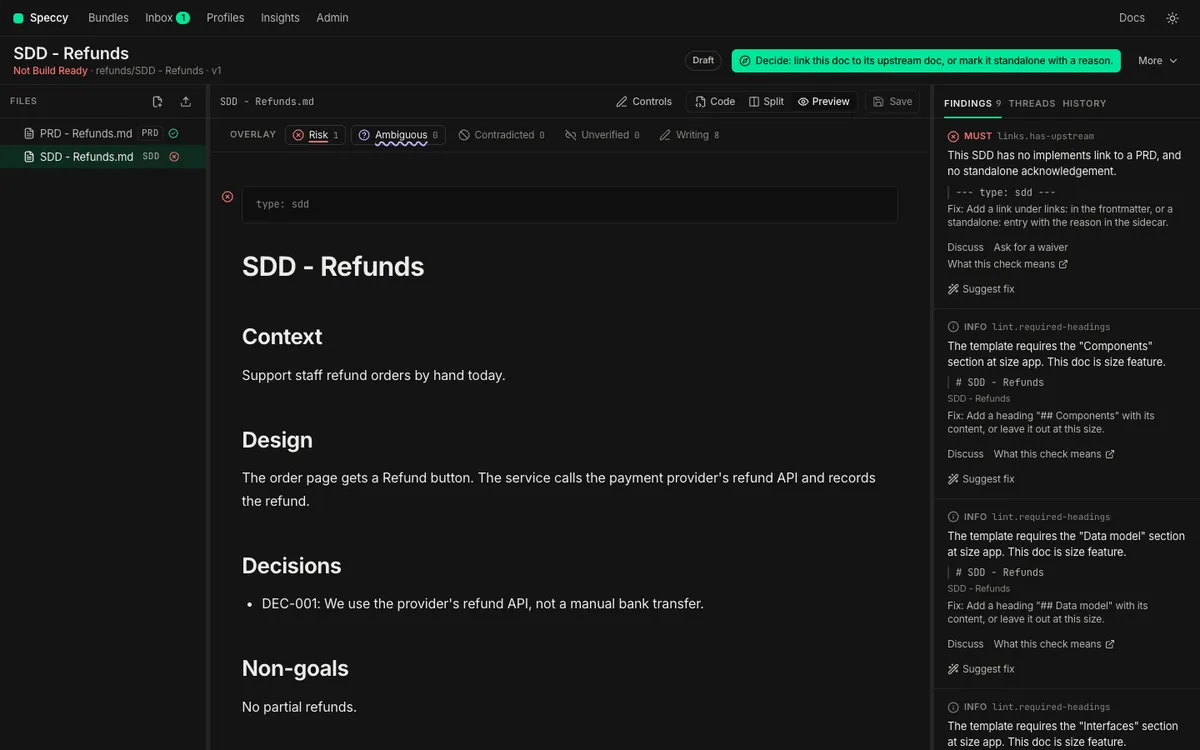
Local mode reads the folder from disk, and the Bundles screen shows the refunds bundle with “2 spec docs: PRD, SDD”. Open it, and click SDD - Refunds.md in the file tree. The file tree marks each spec doc with its profile and its verdict.
2. Link the SDD to the PRD
Section titled “2. Link the SDD to the PRD”The SDD profile requires an upstream link. The SDD has none, so it fails links.has-upstream, a MUST check.
-
On the SDD, open the Findings tab in the rail.
-
On the
links.has-upstreamfinding, click Suggest fix. Speccy lists the PRDs the link can name. The PRD in the same bundle comes first. -
Pick PRD - Refunds, and click Add link.
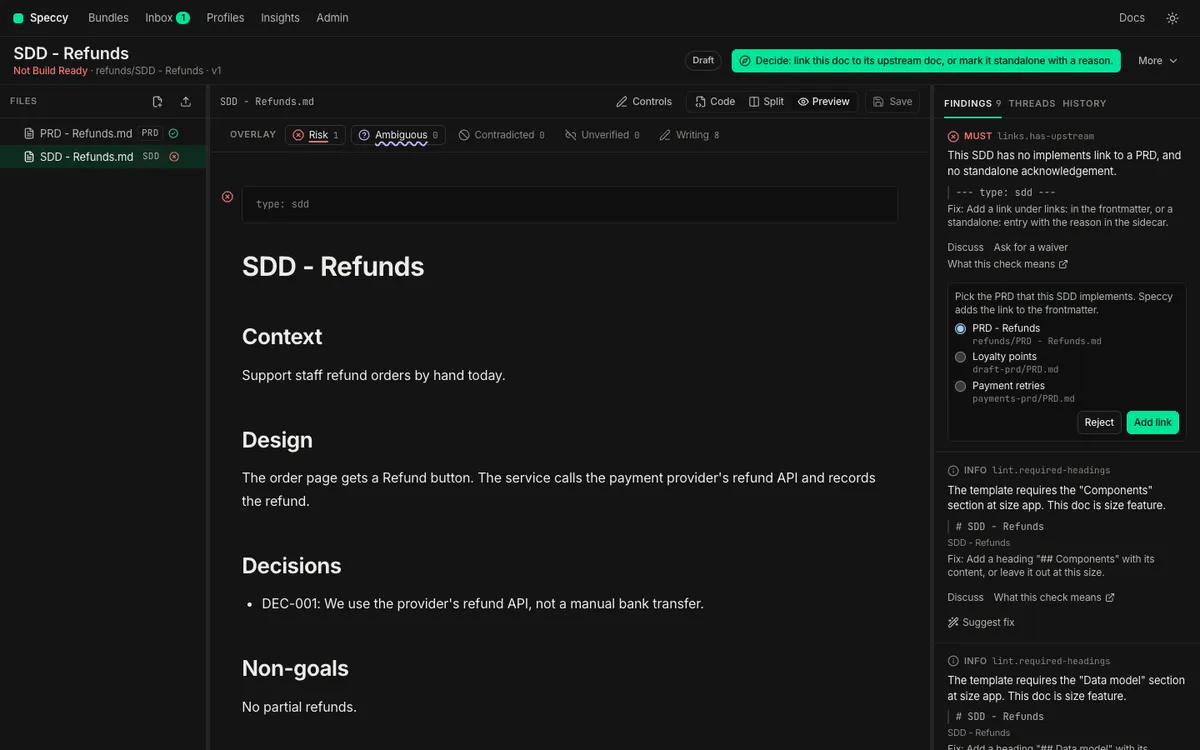
Speccy writes the link into the SDD’s frontmatter as a new version:
type: sddlinks: - kind: implements target: PRD - Refunds.mdThe target is the path of the PRD, relative to the SDD. For a doc in a GitHub source, Speccy keeps the link itself as an adopted link, and the repo takes no commit.
If you picked the wrong PRD, open More → Traceability on the SDD. Under Links, click Remove next to the link, then Remove the link. Speccy takes the link out of the frontmatter as a new version, or forgets an adopted link. Then use Suggest fix again. A link that the repo or a link rule holds shows “(in the repo)” or “(link rule)” and has no Remove. Change it in the repo or in .speccy.yaml.
A doc with no upstream doc says so once, in its sidecar, and the check passes. Click Mark it standalone next to Suggest fix, give the reason, and click Ask for approval. On approval, Speccy writes the entry:
standalone: reason: Internal change to storage. No product change, so no PRD. acknowledged_by: nathan3. Give the PRD trace IDs
Section titled “3. Give the PRD trace IDs”A trace ID is a stable name for one requirement, such as REQ-001. The SDD answers for each ID of the PRD. Speccy reads an ID in these places:
| Where | Example |
|---|---|
| The start of a heading | ### REQ-001 Refund a paid order |
| The first cell of a table row | | REQ-001 | Refund a paid order. | |
| The start of a list item or a paragraph, with a colon or a dash after it | - **REQ-001:** Refund a paid order. |
The prefix comes from the profile. A PRD reads REQ and NFR. A number can have any number of digits. An ID-like word with another prefix, such as FR-001, gets the INFO finding trace.unknown-prefix.
Your PRD has no IDs yet. That is not wrong, and a PRD with no IDs can be Build Ready. It gets the INFO finding trace.no-ids, because no SDD can say which of its items it covers.
-
Click PRD - Refunds.md in the file tree, and open More → Traceability.
-
Under Items without an ID, Speccy suggests an ID for each item under the requirements heading. Keep all three ticked.
-
Click Add 3 IDs.
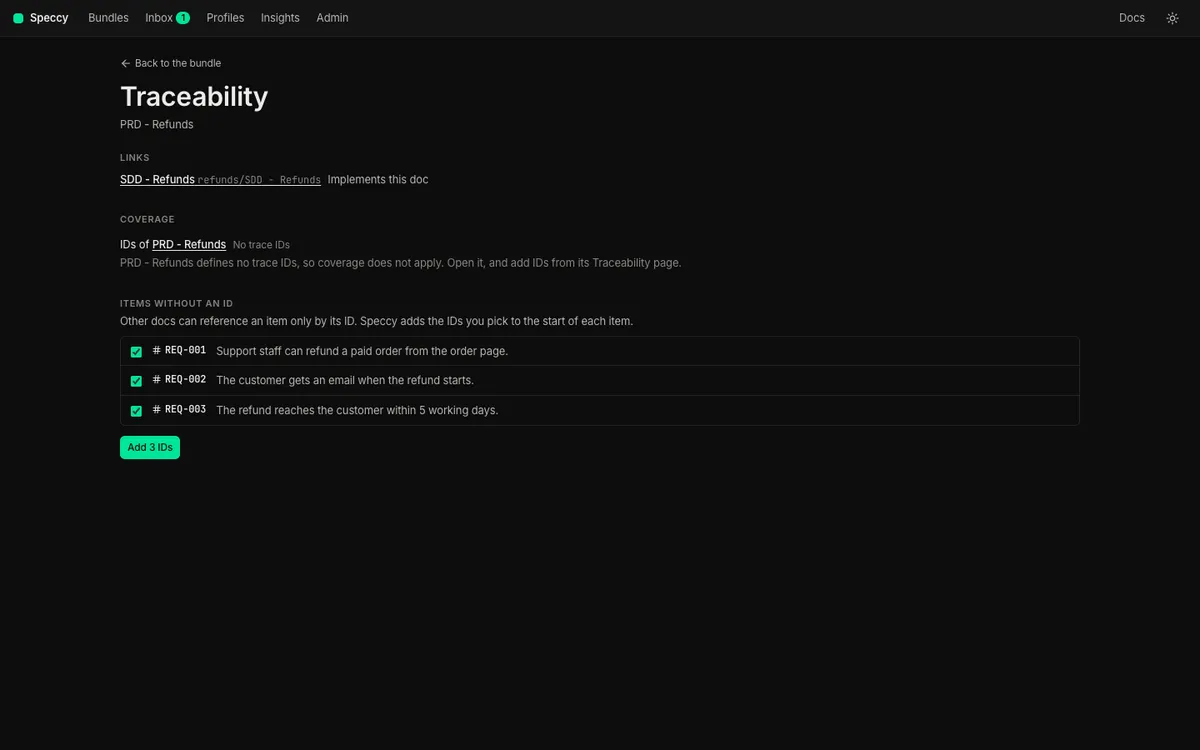
Speccy writes the IDs as a new version, and says how many it added. Each requirement now starts with its ID, such as - **REQ-001:** Support staff can refund a paid order from the order page.
4. Read the matrix
Section titled “4. Read the matrix”On the PRD’s Traceability page, Coverage shows each PRD ID against each doc that implements it.
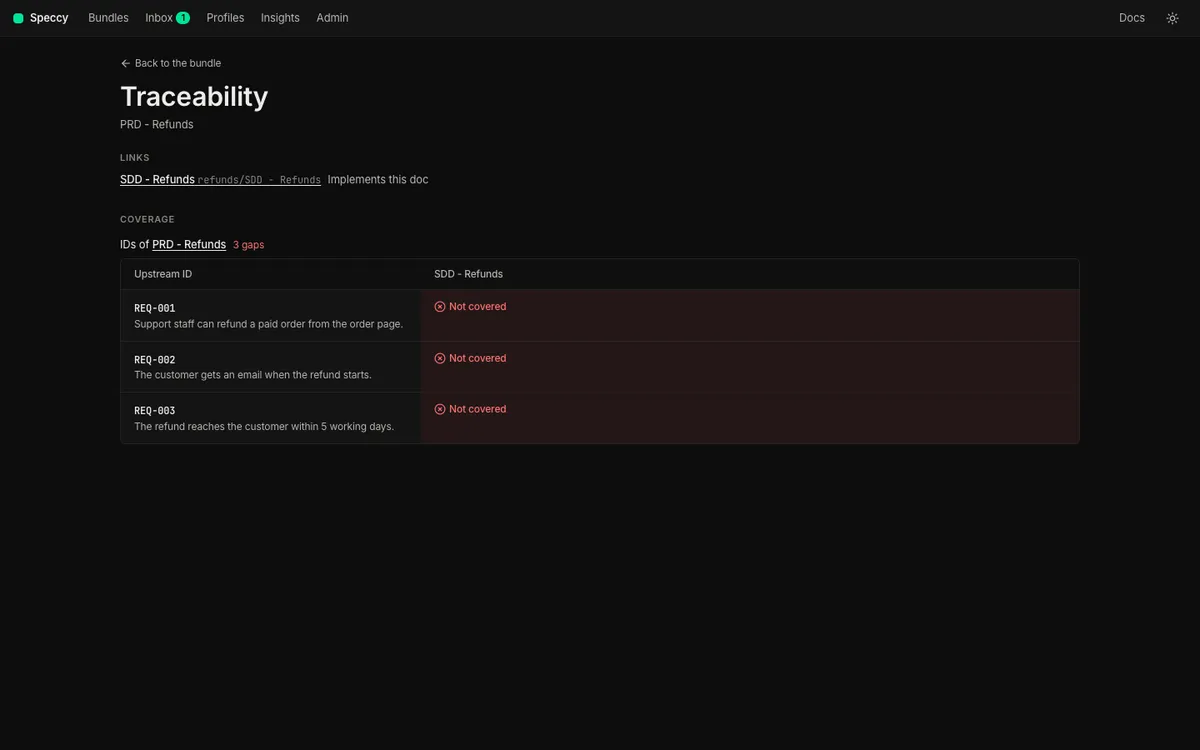
A cell says one of four things:
- Referenced: the SDD names the ID. The cell links to each section that names it, and a click opens the SDD there.
- Covered by another doc: an approved acknowledgement names the doc that covers it.
- Out of scope: an approved acknowledgement says this doc does not cover it, with a reason.
- Not covered: none of the above. This is a gap, and it blocks the verdict.
Your SDD names no PRD ID yet, so the matrix shows three gaps. When a PRD defines no IDs, the matrix says No trace IDs, and coverage does not apply to the SDD.
5. Close each gap
Section titled “5. Close each gap”Each gap is a MUST finding trace.coverage on the SDD. Open the SDD. Its next action asks about the first gap: “Decide: does this doc cover REQ-001?”
-
Click the next action. The tour opens on the gap.
-
Press
d. Speccy offers three answers: This doc covers it, Another doc covers it and Out of scope. -
For REQ-001, pick This doc covers it. Pick the Design section, and click Add the line.
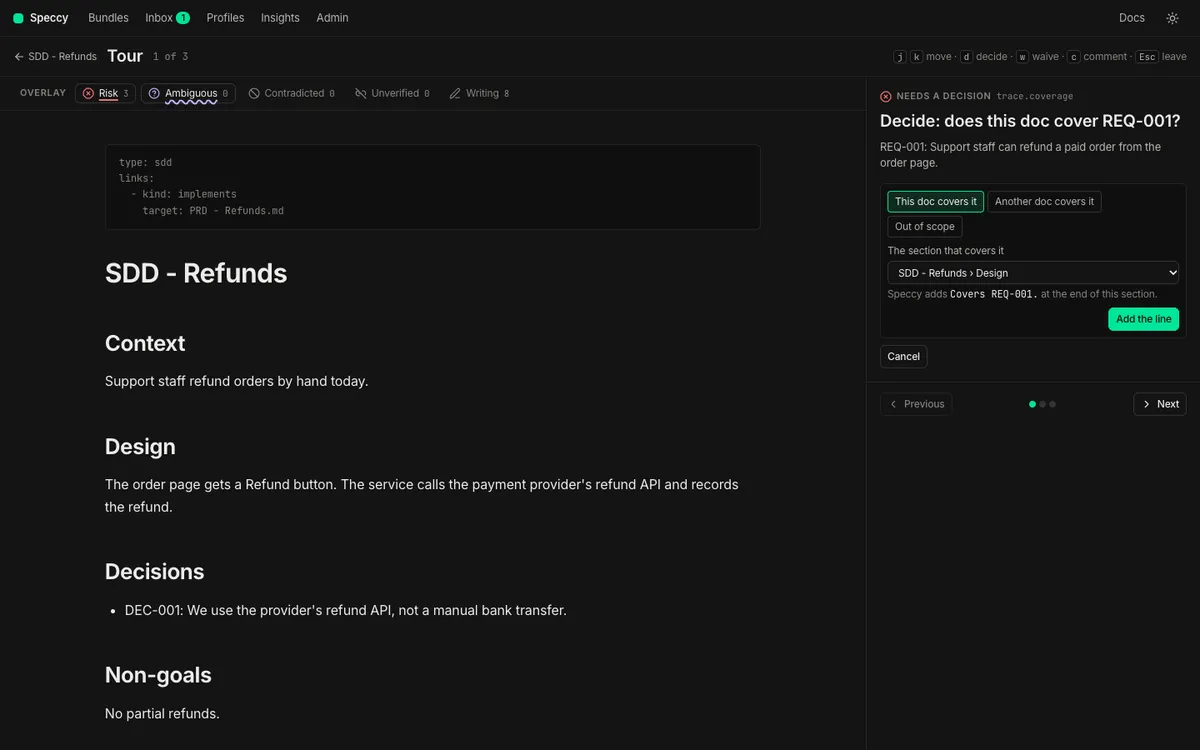
Speccy adds the line Covers REQ-001. at the end of the Design section, as a new version. The ID is now in the doc, where a builder reads it. You can also name an ID anywhere in the SDD by hand.
The other two answers are acknowledgements:
- Another doc covers it: pick the doc, and give a reason.
- Out of scope: give a reason.
Close the other two gaps:
-
Go to the REQ-002 gap.
jandkmove between points. Pressd, pick Out of scope, and give the reason “The mail service sends every customer email.” Click Ask for approval. -
Go to the REQ-003 gap. Press
d, pick This doc covers it, pick Design, and click Add the line.
An acknowledgement follows the profile’s waiver policy, so a maintainer approves a MUST gap. The request waits in the approver’s inbox and in the tour. In local mode you are the admin, so the tour shows Approve on the request. Click it.
On approval, Speccy writes the acknowledgement into the SDD’s sidecar, .speccy/decisions/<doc path>.yaml. The SDD text does not change:
trace: - id: REQ-002 status: out_of_scope reason: The mail service sends every customer email. acknowledged_by: nathanAn acknowledgement is about the ID, not a section. An edit to the SDD does not end it. The matrix shows each answer, with its reason. Withdraw in the cell takes the acknowledgement back at once, and the gap opens again. A gap cell has Answer, which opens the same three answers as the tour.
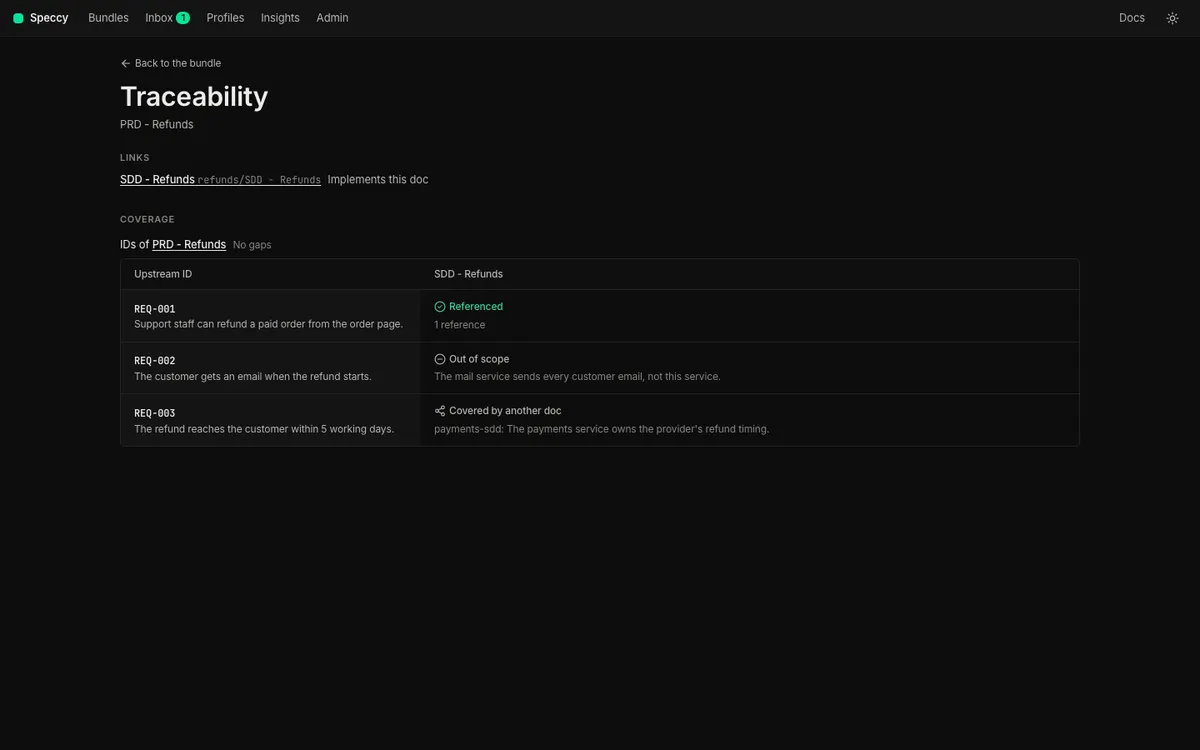
Close a coverage gap covers each answer in more detail.
6. Do not repeat the PRD
Section titled “6. Do not repeat the PRD”An SDD that copies its PRD drifts from it the first time either one changes. coherence.restatement is a SHOULD check. It fires when more than half of a paragraph’s 8-word runs appear in one paragraph of the PRD. It runs on each save, with no model.
Try it. In the SDD, replace the Context paragraph with the PRD’s Problem sentence:
Support staff refund orders by hand, and each refund takes a day.Click Save. The Findings tab shows a SHOULD finding on the paragraph.
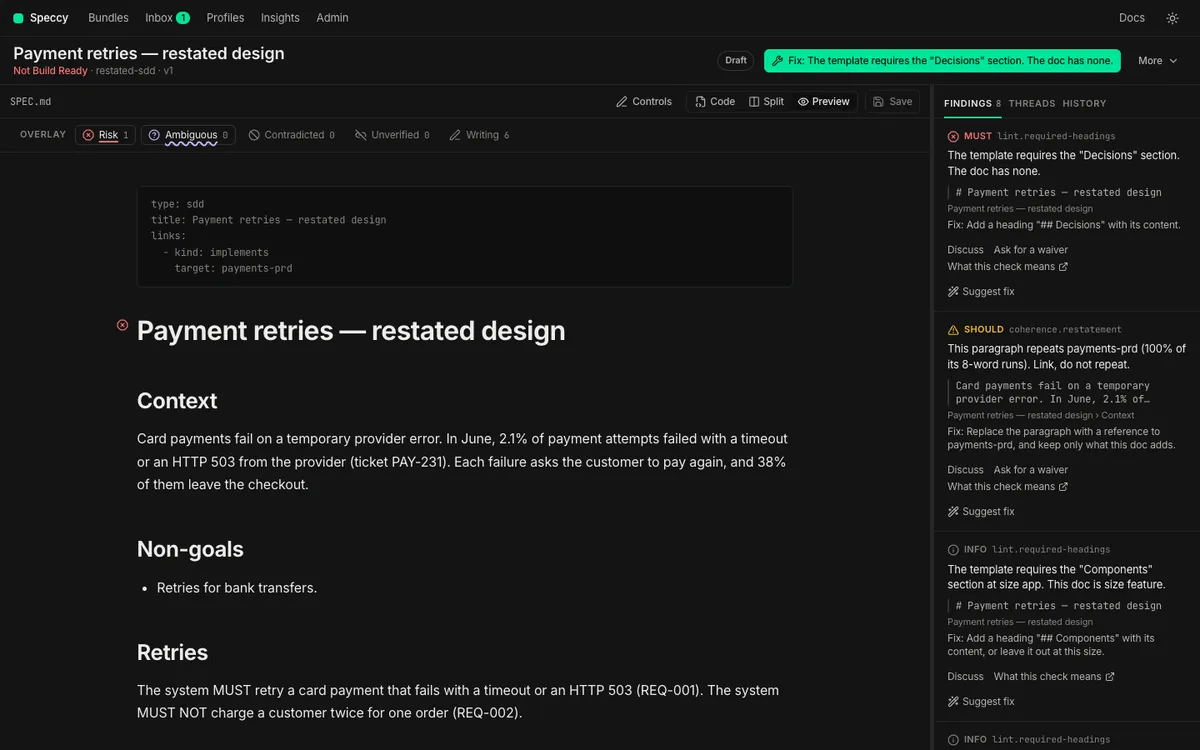
The fix is a reference, not a copy. Name the ID, and keep only what the SDD adds. Put the Context paragraph back, and click Save.
7. Find a contradiction
Section titled “7. Find a contradiction”A full review reads the SDD and the PRD with a model, and looks for statements that conflict. A conflict is the MUST finding coherence.contradiction, anchored in both docs.
-
In the SDD’s Design section, add the sentence “Refunds reach the customer within 10 working days.” Click Save.
-
Open More → Run a review, and click Run review.
-
When the run ends, click Contradicted in the overlay legend above the preview. The layer marks the statement that conflicts with the PRD.
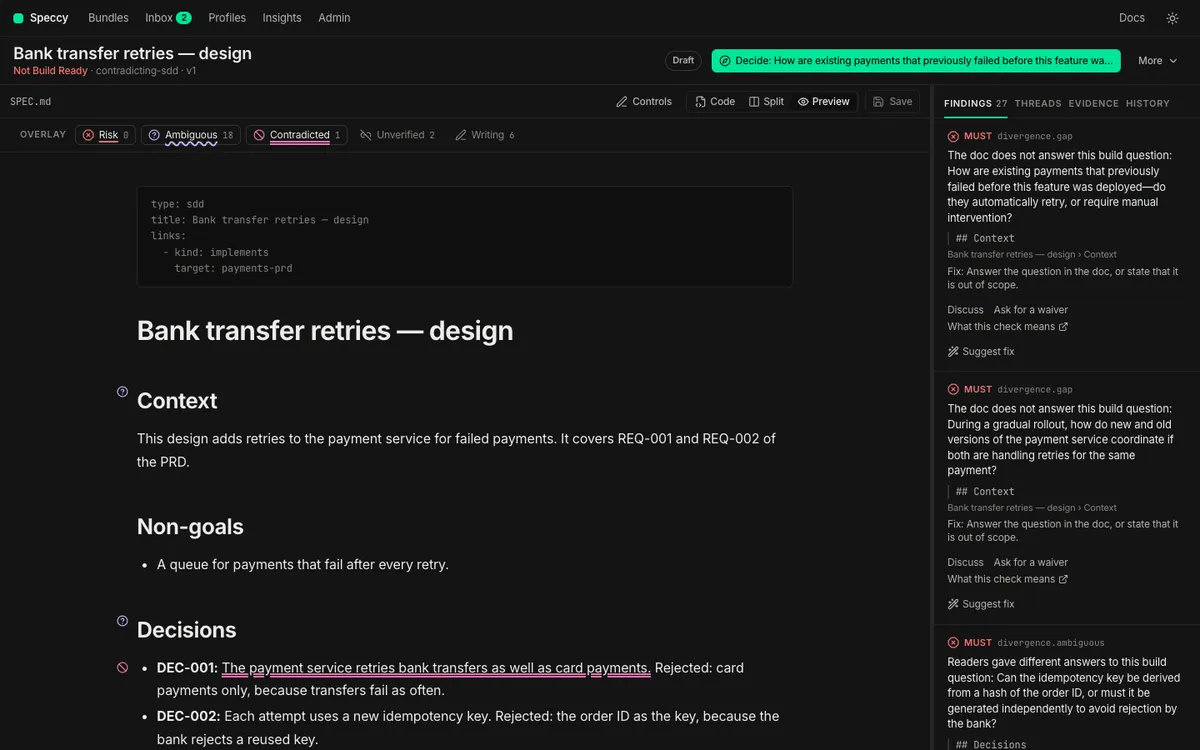
The finding names the other doc, and quotes the line it conflicts with. A contradiction needs a decision, not a waiver: one of the two docs is wrong. Here the PRD says 5 working days. Delete the sentence from the SDD, and click Save.
8. See a PRD edit make the verdict stale
Section titled “8. See a PRD edit make the verdict stale”A verdict is about one version of one doc, read against the versions of its linked docs. A change to the PRD means the SDD’s verdict no longer describes docs that exist.
Open the PRD, and add a fourth requirement:
- **REQ-004:** Support staff can see the refund state on the order page.Click Save, and open the SDD.
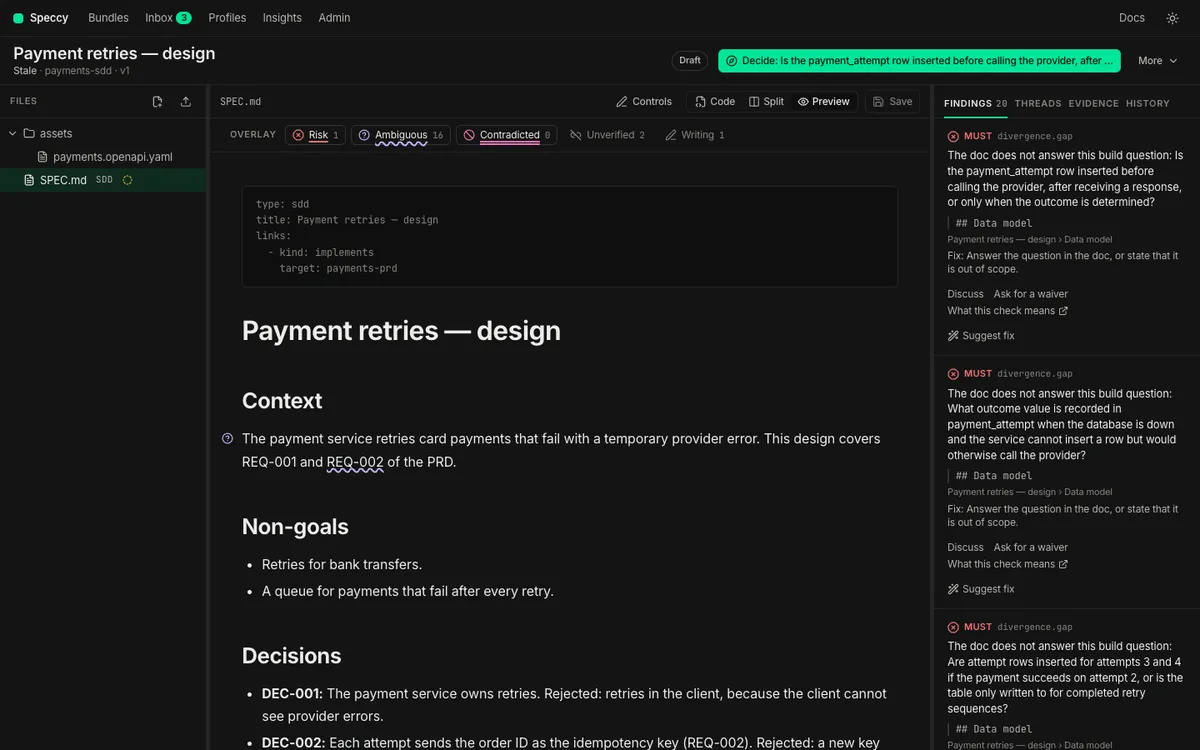
A lint verdict costs nothing, so Speccy lints the SDD again at once, and the new ID is a new gap. A full verdict keeps its model results and goes stale instead. The control row says “Stale” and names the PRD that changed. Run the review again to replace it. Then close the REQ-004 gap as in step 5.
9. Hand the SDD to a builder
Section titled “9. Hand the SDD to a builder”Repeat the review and the fixes until the SDD’s control row says Build Ready. Then write its build packet, from your specs folder:
speccy handoff "refunds/SDD - Refunds.md" --out ../refunds-buildThe packet holds the SDD, its assets, and the PRD it links to. HANDOFF.md, the re-entry prompt, lists the SDD’s own trace IDs, such as DEC-001, as the units of work. The SDD names each PRD ID it covers, so the builder reads each requirement next to the design that meets it. Hand a spec to a coding agent covers the MCP server and the build reports.
What you have now
Section titled “What you have now”- One bundle,
refunds, with a PRD and an SDD that implements it. - A PRD with trace IDs, and an SDD that references or acknowledges each one.
- A sidecar beside the SDD with the out-of-scope acknowledgement.
- A build packet for the SDD.
- Link to an issue, a page, or the code to trace a doc to things outside Speccy.
- Verify a build to check the code against each trace ID.
- Read traceability to see how Speccy reads links and IDs.