

Verify a build
This guide shows you how to check the code that a builder wrote against the spec doc it built from.
A verification run reads one code repo at one commit, or one folder. It finds the code and the tests that meet each trace ID of the doc, and it gives each trace ID one outcome. Speccy reads the code. It runs no code and no tests. A cited test is a citation, never a pass.
Before you start
Section titled “Before you start”- The spec doc defines trace IDs whose prefix is in the profile’s
verify.prefixes. The default isREQandNFR. A decision ID names no code, so the run skips it and counts it. A doc with no such ID cannot start a run. Add IDs from More → Traceability first. - Admin names a model for the reviewer role and for the judge role. Add a model backend shows how.
- For a GitHub repo, Speccy has a credential that reads it. Local mode uses your
ghlogin, or the token in Admin, under GitHub.
A trace ID is a MUST when its definition holds the word MUST. Every other trace ID is a SHOULD. Only a MUST can block.
Name the code in the doc
Section titled “Name the code in the doc”An implemented-by link names the repo that builds the doc. The run then needs no URL:
type: sddtitle: Payment retrieslinks: - kind: implemented-by target: github:acme/payments#internal/payThe path in the link does not narrow the run. The run reads the whole repo, because code often meets a requirement outside the linked folder. Link to an issue, a page or the code covers the target forms.
Start a run
Section titled “Start a run”-
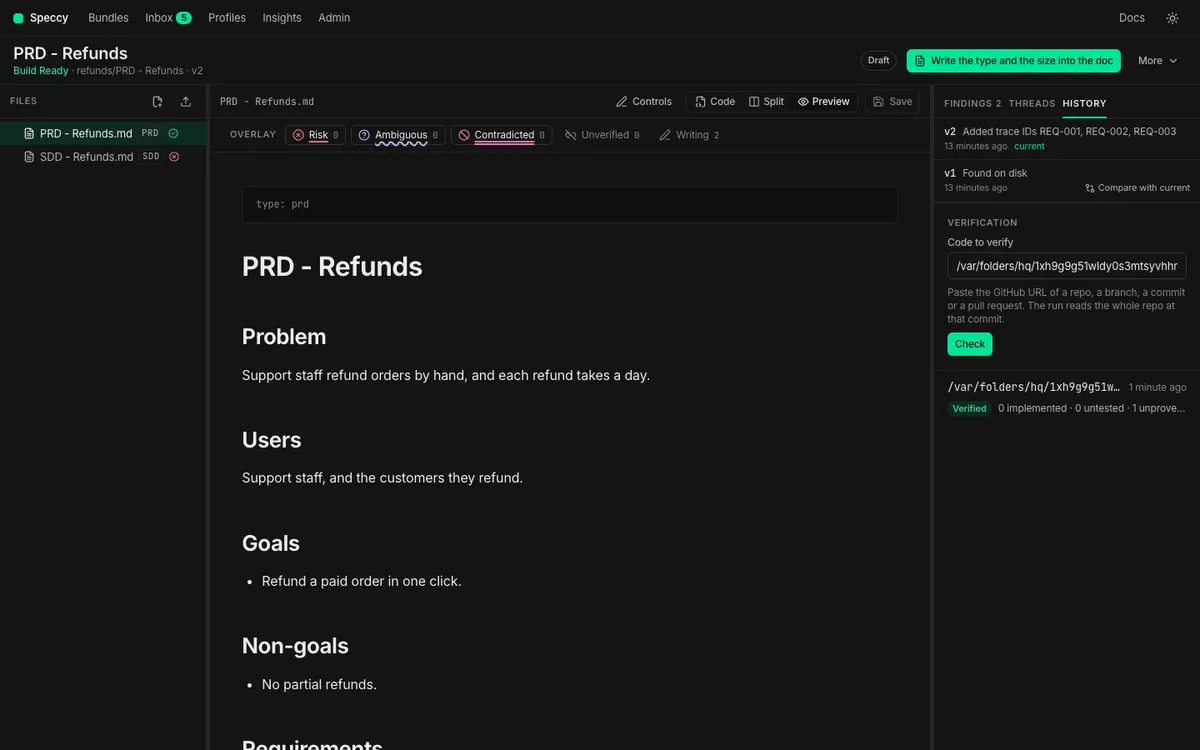
Open the spec doc, and open the History tab of the rail. The Verification panel sits at the end.
-
Check the Code to verify field. It holds the repo of the
implemented-bylink, or else the repo of the last run. With two or more linked repos, click one of them under the field. -
To verify another build, paste its GitHub URL: a repo, a branch, a file or folder in a branch, a commit or a pull request. In local mode, an absolute folder path also works.
-
Click Check. Speccy shows the repo, the branch or the pull request, and the short commit that it reads.
-
Click Verify, or click Change to name other code.
The panel follows the run. It shows the repo it reads, then “Finding where each requirement lives”, then each trace ID that the judge reads.
Name the bundle, and the code as a GitHub URL or a folder:
speccy verify docs/specs/pay https://github.com/acme/payments/pull/12With no URL, Speccy reads the repo of the implemented-by link, at the head of its default branch:
speccy verify docs/specs/payThese forms also work:
speccy verify docs/specs/pay --repo acme/payments --sha 4f2a9c1especcy verify docs/specs/pay --path ../payments --summaryThe command waits for the run. It prints one row for each trace ID, with the file and line of the target that holds, then the run verdict. --summary prints the verdict only. --handoff <id> ties the run to a handoff. The command exits with code 1 when the run is Not Verified.
The agent that took the build packet calls verify_build with the bundle and one of these:
target: a GitHub URL, or an absolute folder in local mode.repoandsha.path: a folder.- Nothing: the repo of the
implemented-bylink.
handoff ties the run to the handoff from the packet. claims gives builder claims. MCP tools lists every input.
A repo URL reads the head of the default branch. A branch, file or folder URL reads the head of its branch. A commit URL reads that commit, and a pull request URL reads its head commit. The run records the commit it read. A pasted URL writes nothing into the doc.
In a pull request, speccy action --verify runs the same check. Keep the verdict in CI covers the Action.
How Speccy finds the code
Section titled “How Speccy finds the code”A code target is a repo path and an anchor quote: a verbatim string that must appear in that file exactly once. A test target has the same form, anchored on the test declaration line. Speccy finds the targets of each trace ID in one of three ways, in this order:
- A builder claim. A builder who knows where a requirement lives says so, through
verify_build. The claim replaces what Speccy finds for that trace ID. Every target in the claim must hold, or none of them counts. - The trace ID in the code. Speccy searches every file it reads for the literal trace ID, such as
REQ-012in a comment or a test name. The whole line is the anchor quote. A file in a test folder, or with a test name such as_test.goor.spec.ts, gives a test target. - A model. For a trace ID that appears nowhere, a model picks files and quotes a line from each. Speccy keeps a quote only when it finds it in the file. A model can add a candidate, never a fact.
A quote that appears zero times, or more than once, does not hold. The row then says why. Mention the trace ID in the code, next to the code that meets it, and the run finds it with no model.
The scan skips binary files, files over verify.max_file_kb, and the paths in verify.exclude. The model sees at most verify.max_mapper_files files. The run report names each limit that the scan hit.
Read the outcomes
Section titled “Read the outcomes”A judge reads the requirement and the cited code. It must quote both. The absence of a conflict is not evidence.
| Outcome | What it means |
|---|---|
| implemented | A code target holds, a test target holds, and the judge found the requirement in the code. |
| untested | The judge found the requirement in the code, and no test target holds. |
| unproven | A code target holds, and the judge neither found the requirement nor found a contradiction. |
| missing | No target holds. |
| breached | Two judges agreed that the cited code contradicts the requirement. |
A breached outcome needs a second, independent judge. When the second judge does not agree, the outcome is unproven, with the note “possible breach”, and it does not block. When the definition does not parse in the shapes of the requirement grammar, a breach reports at SHOULD.
Unproven is always a SHOULD. A judge’s silence does not stop a build.
The run has its own verdict: Verified or Not Verified. A run is Not Verified when a MUST trace ID is missing or breached, and no waiver covers it. The run computes no Build Ready verdict.
What happens
Section titled “What happens”For each MUST trace ID that is missing or breached, Speccy opens a blocking thread on the requirement. The title names the trace ID, the outcome and the repo. A blocking thread makes the bundle Not Build Ready until a person resolves it. Answer the thread: say where the code is, change the code, or change the requirement. Then click Resolve.
The History tab lists the runs, newest first, with Verified, Not Verified or Stale, and the count of each outcome. Click a finished run to see the outcome of each trace ID. More → Traceability shows the newest run under Code and tests: each trace ID, its outcome, the code target and the test cited.
Insights shows the breach rate of each profile beside False ready. It is the share of the verified trace IDs that came back breached or missing. A high rate says that the requirements of the profile’s docs are built wrong.
A run is a statement about one commit. A new commit in the code repo makes no run stale. A new version of the spec doc makes every earlier run stale, because the requirements moved. Run the check again on the new version.
Excuse one trace ID
Section titled “Excuse one trace ID”A verification waiver excuses one trace ID in one code repo. It keeps the rest of the waiver mechanism. It needs a reason of at least 20 characters, and it follows the profile’s policy for a MUST. It ends when the section of the requirement changes. It never goes in the sidecar. The sidecar travels with the doc into every build, and this exception belongs to one repo.
-
Open the History tab, and click the run.
-
Find the missing or breached trace ID, and click Ask for a waiver.
-
Write the reason, and click Ask.
The outcome row shows the request, the approvals it has, and the approvals the policy needs. After the approval, the row says so.
The CLI and the MCP server have no control that asks for a verification waiver. A script asks through the HTTP API. The doc ID is the last part of the bundle page URL, /bundles/<bundle id>/docs/<doc id>:
curl -X POST http://127.0.0.1:7878/api/v1/docs/<doc id>/verification-waivers \ -H "Content-Type: application/json" \ -d '{"trace_id": "REQ-012", "repo": "acme/payments", "reason": "The retry limit lives in the gateway config, not in this repo."}'repo is the repo as the run names it, such as acme/payments. In hosted mode, send a personal API token as Authorization: Bearer <token>.
The request waits in the approver’s Inbox and in the tour, as any waiver does. The inbox link opens the run that the request came from, and the approver clicks Approve or Reject on the outcome row. Ask for and approve a waiver shows the approval. The next run counts the trace ID as waived, and the run verdict counts the waivers.
Related
Section titled “Related”- Hand a spec to a coding agent: the handoff that comes before the run.
- Traceability: trace IDs from the requirement to the code.
- Profile schema: the
verifykeys. - CLI and MCP tools.