

Handoffs and build reports
This page explains what happens after Build Ready: the handoff, the build packet, the build reports, and the verification run.
Speccy never runs the build. A person or a coding agent builds the thing. Speccy gives the builder what the doc says, records what the builder took, and hears back what the doc did not say.
The handoff
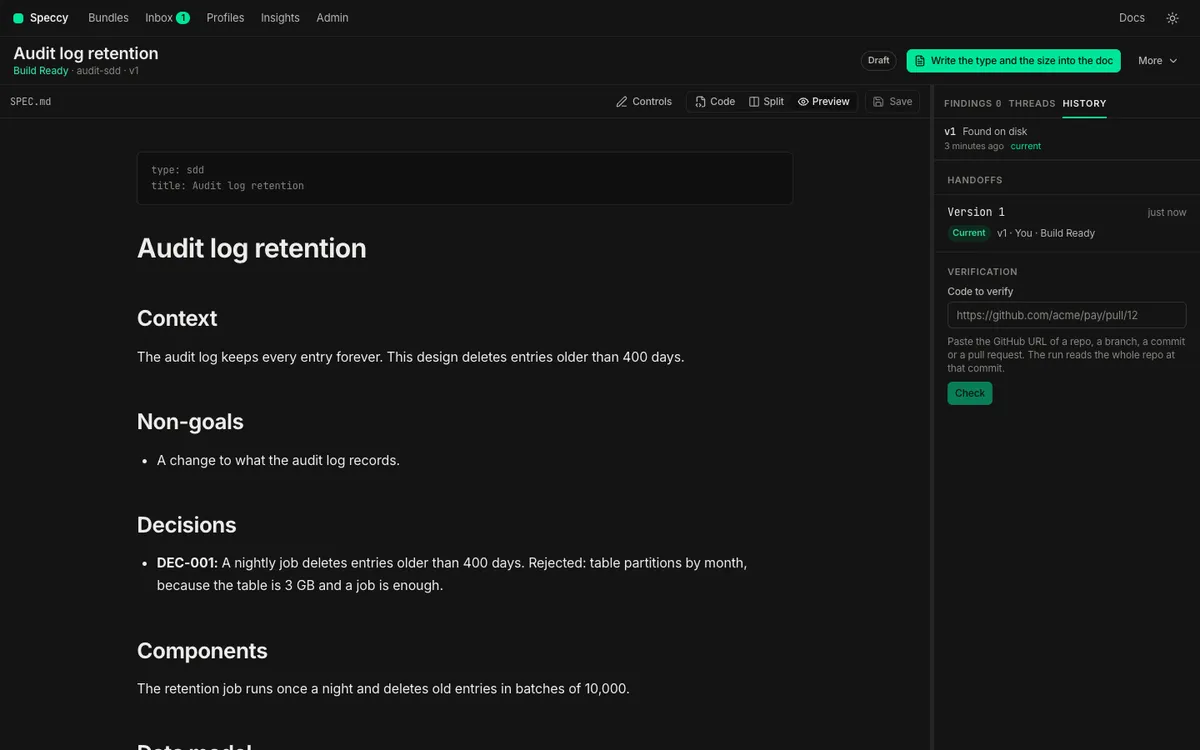
Section titled “The handoff”A handoff is one record that a builder took a build packet for one version of a spec doc. It holds the version, the verdict at that moment, who took it, and a label such as a repo, a branch or a ticket.
A builder takes the packet with the MCP tool handoff_bundle, or with speccy handoff <path> --out <folder>. Speccy gives the packet only for a current Build Ready verdict. A builder can take it anyway with the acknowledged flag, and the handoff records that.
History lists the handoffs of a spec doc beside its versions. A handoff of the current version says “Current”. A handoff of an older version says “Stale”, because the doc changed after the builder took it.
The build packet
Section titled “The build packet”A build packet holds what a builder needs to build one version, and nothing the builder has to fetch:
- The spec doc, and each file of the bundle, such as its assets.
- The spec doc of each bundle it links to, in a
linksfolder. - Each external link, with its kind and its URL. A code target also carries the commit that the last run read.
- The trace IDs of the spec doc, in the order of the doc.
- The build questions of the newest full review, with the answer the readers agreed on.
A build question that the readers read differently carries no answer. Neither does a gap. Speccy fetches no issue text and no page text into the packet.
The re-entry prompt
Section titled “The re-entry prompt”The packet includes a re-entry prompt, HANDOFF.md. A coding agent reads it to resume the build after it loses its context. It has five parts:
- Read: the spec doc and its version, the assets, the linked docs, and the external links.
- Answers: each build question with its agreed answer. A question with a gap or a divergence tells the agent to ask the author.
- Work: one checkbox line for each trace ID of the doc. A doc with no trace IDs leaves the agent to write the list.
- If you get stuck: how to send a build report, with the handoff ID.
- Done when: every line ticked, the checks of the project passing, and nothing left unbuilt without a reason.
The agent owns the file after the handoff, and ticks lines as it works. Speccy never reads it back.
Build reports
Section titled “Build reports”A build report is what a coding agent tells Speccy about the doc after it took a build packet. The agent sends it with the MCP tool report_build, or with speccy report. Each report names the handoff, and it can name a section or a trace ID, so the question lands on that text.
A report has one of two kinds:
- A blocked report says that the agent cannot build a section without an answer. It opens a blocking thread on the section or the trace ID that the report names. The blocking thread makes the spec doc Not Build Ready until a person resolves it.
- A note says that the agent built something, but the doc was unclear. It opens an ordinary thread, and it changes no verdict.
A blocked report against an older version never blocks. The doc changed after the builder took it, so the answer can be in the doc already. Speccy opens the thread as a note, and says which version the builder took.
The false-ready rate
Section titled “The false-ready rate”For one profile, the false-ready rate is the share of Build Ready handoffs that came back blocked. Insights shows it as “False ready” on the card of each profile, with the sections that blocked a builder.
The rate counts only the handoffs a builder took at Build Ready without acknowledged. A handoff taken without Build Ready is no evidence against the profile.
The false-ready rate measures the review against what builders meet. A high rate says that the checks of the profile pass docs that a builder cannot build. Read the sections that blocked builders, and add a check that asks for what they lacked.
Verification runs
Section titled “Verification runs”A verification run is the post-build gate. It checks one version of a spec doc against one code repo at one commit, or against a folder on disk. Speccy reads the code. It runs no code and no tests, so a cited test is a citation, never a pass.
For each trace ID, the run looks for a code target and a test target. A target is a repo path and an anchor quote. The anchor quote is a verbatim string that must match exactly once in its file. The targets come from one of three places:
- A literal occurrence of the trace ID in the repo.
- The reviewer model, which proposes a target. Speccy then checks the quote in the file.
- A builder claim, which names the commit, the code targets and the test targets for one trace ID. A claim replaces what Speccy finds for that ID, and each of its targets must hold.
A judge model then reads the cited code against the text of the requirement. Each trace ID gets one outcome:
| Outcome | What it means |
|---|---|
| implemented | A code target holds, a test target holds, and the judge found the requirement in the code. |
| untested | The judge found the requirement in the code, and no test target holds. |
| unproven | A code target holds, and the judge neither found the requirement nor found a contradiction. |
| missing | No target holds. |
| breached | Two judges agree that the cited code contradicts the requirement. |
A contradiction that only one judge finds is unproven, with the note “possible breach”, at SHOULD. A breach on a definition that does not parse as a requirement reports at SHOULD too.
The run has its own verdict: Verified or Not Verified. It computes no Build Ready verdict. Each missing or breached MUST opens a blocking thread on the spec doc. The blocking thread then makes the spec doc Not Build Ready. A person answers the thread. An approved verification waiver excuses that trace ID in that repo.
Insights shows the breach rate of each profile beside “False ready”. It is the share of the verified trace IDs that came back breached or missing. The false-ready rate measures the review against what builders meet. The breach rate measures it against the code that builders wrote.
The verify section of the profile sets the prefixes a run checks, REQ and NFR by default, and the bounds of the scan. The Code and tests section of Traceability shows the result of the newest run. Verify a build shows how to start a run.
Hand a spec to a coding agent shows the handoff and the build reports step by step.