

Traceability
This page explains how Speccy links spec docs, reads trace IDs, and checks that linked docs agree.
A PRD says what to build. An SDD says how. Speccy reviews each one on its own, and it also checks that the SDD answers for each requirement of the PRD. Links and trace IDs make that check possible.
A link is a typed relation between two bundles. The kind says what the relation means, and which checks read it.
| Kind | What it means | Checks that read it |
|---|---|---|
implements |
This doc builds what the target asks for, such as an SDD for its PRD. | Upstream link, coverage, restatement, contradiction |
refines |
This doc adds detail to the target. | Restatement, contradiction, children |
references |
This doc points at the target. | Contradiction, children |
supersedes |
This doc replaces the target. | None. The target’s status becomes Superseded. |
implemented-by |
The code that builds this doc. | Drift |
The first four kinds link two bundles. implemented-by is an external link, and the section on external links below explains it.
Where a link comes from
Section titled “Where a link comes from”A link has one of three origins:
- Frontmatter. The doc lists its links under
links, each with akindand atarget. The target is a path relative to the doc, or the slug of a bundle. - An adopted link. A person confirmed the link in Speccy for a doc in a repo source. Speccy keeps it and writes nothing into the repo. A frontmatter link of the same kind replaces it.
- A link rule.
link_rulesin.speccy.yamllinks bundles by a path convention. A rule makes a link only when the target exists.
type: sddtitle: Refundssize: featurelinks: - kind: implements target: PRD - Refunds.mdlink_rules: - docs/sdd-{name}.md implements docs/prd-{name}.mdA target that names a bundle resolves only when exactly one spec doc in that bundle fits the link. Speccy never picks a doc without a clear match. The Links section of Traceability marks a link from a rule “(link rule)”. Remove forgets an adopted link, or takes a link out of the frontmatter of a doc Speccy writes, as a new version. A frontmatter link in a repo doc stays with the repo.
Trace IDs
Section titled “Trace IDs”A trace ID is a stable name for one item of a doc, such as REQ-012 or DEC-004. It is 2 to 6 capital letters, a dash and a number. The profile says which prefixes a doc uses:
trace.prefixesare the prefixes the doc defines. The built-in PRD defines REQ and NFR. The built-in SDD defines REQ, DEC and NFR.trace.coverare the upstream prefixes a downstream doc must reference. The built-in SDD covers REQ and NFR.
A definition and a reference
Section titled “A definition and a reference”Speccy reads an ID as a definition only at the start of an item:
| Where | Example |
|---|---|
| The start of a heading | ### REQ-001 Refund a paid order |
| The first cell of a table row | | REQ-001 | Refund a paid order. | |
| The start of a list item or a paragraph, with a colon or a dash after it | - **REQ-001:** Refund a paid order. |
Any other place is a reference. A sentence that starts with an ID and no colon or dash stays a reference.
Lint checks the IDs on every save:
lint.duplicate-idis a MUST: one doc defines an ID twice.lint.dangling-refis a SHOULD: a reference names an ID that no item defines. For an upstream prefix, no linked upstream doc defines it.trace.unknown-prefixis an INFO hint: an ID-like word starts an item, and the profile does not read its prefix.trace.no-idsis an INFO hint: a requirements, decisions or non-functional section has no trace ID.
A doc with no IDs can still be Build Ready. But no downstream doc can then say which of its items it covers. The Traceability page of that doc suggests an ID for each item under a requirements heading.
Coverage and the matrix
Section titled “Coverage and the matrix”For each implements link, each upstream ID with a trace.cover prefix needs an answer in the downstream doc. The downstream doc references the ID, or an acknowledgement answers for it. An ID with neither is a gap, and a gap is the MUST finding trace.coverage.
The matrix of Traceability shows each upstream ID against the doc that implements it. A cell says one of four things:
- Referenced: the downstream doc names the ID.
- Covered by another doc: an approved acknowledgement names the doc that covers it.
- Out of scope: an approved acknowledgement says this doc does not cover it, with a reason.
- Not covered: a gap. It blocks the verdict.
When the upstream doc defines no IDs, the matrix says “No trace IDs”, and coverage does not apply.
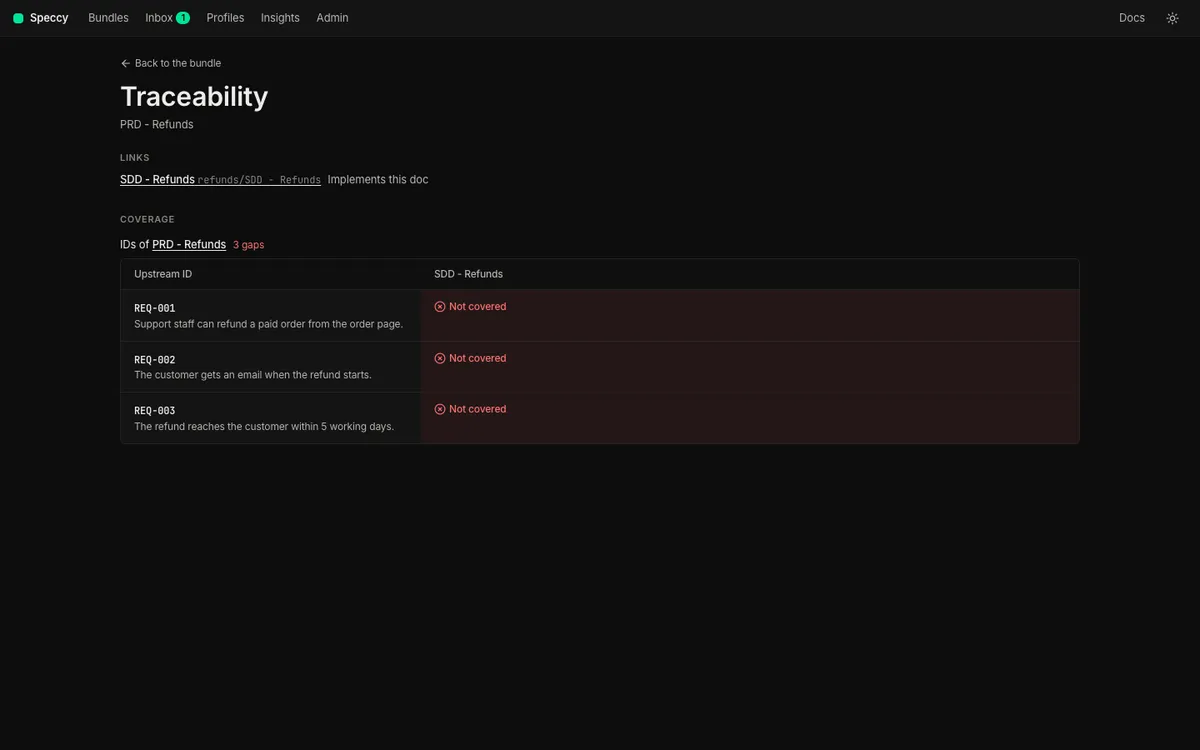
A gap has three answers. “This doc covers it” adds the line Covers REQ-001. at the end of the section you pick, as a new version. “Another doc covers it” and “Out of scope” are acknowledgements, with a reason. They follow the waiver policy of trace.coverage, so a maintainer approves them in the built-in profiles. Close a coverage gap shows each answer.
The matrix acts on its cells for a person who can edit the downstream doc of that column:
- A Not covered cell has Answer. It opens the three answers for the doc of that column.
- A Covered by another doc or Out of scope cell has Withdraw. It takes the acknowledgement out of the sidecar at once, with no approval, and the gap opens again.
- A Referenced cell links to each reference, and opens the doc at that line. It has no Withdraw, because the reference is prose in the doc.
Restatement
Section titled “Restatement”An SDD that copies its PRD falls out of step with it the first time either one changes. coherence.restatement compares each paragraph of the doc with each paragraph of the docs it implements or refines. It fires when more than half of a paragraph’s 8-word runs appear in one upstream paragraph. It is a SHOULD, and it needs no model.
The fix is a reference, not a copy. Name the ID, and keep only what this doc adds.
Contradiction
Section titled “Contradiction”A full review reads the doc against each doc it implements, refines or references. The reviewer looks for two statements that cannot both hold. Speccy keeps a conflict only when both quotes are in their docs, and it drops a pair that can both hold. A conflict is the MUST finding coherence.contradiction, with the quote from each doc.
A contradiction needs a decision: one of the two docs is wrong. Change that doc.
A stale verdict after an upstream edit
Section titled “A stale verdict after an upstream edit”A verdict reads one version of the doc against one version of each linked doc. When a linked doc gets a new version, the verdict no longer describes what exists.
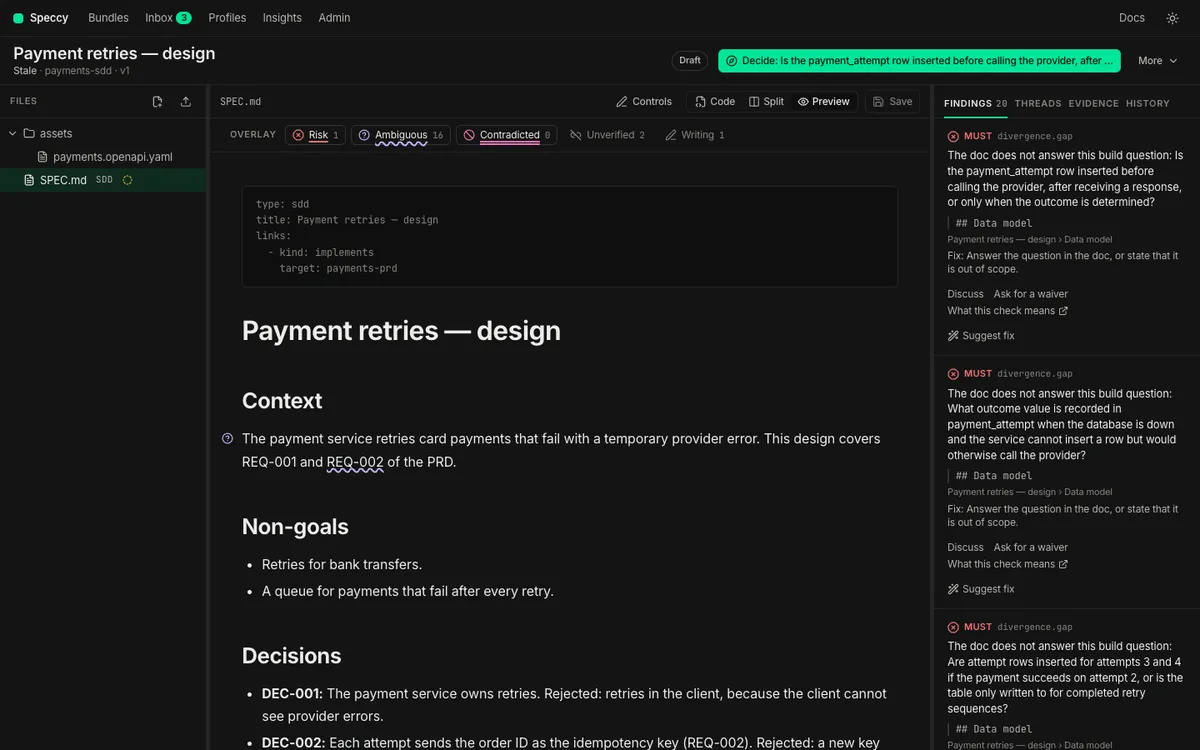
A lint verdict costs nothing, so Speccy lints the downstream doc again at once. A new upstream ID then shows as a new gap. A full verdict keeps its model results, and it reads Stale. The control row names the linked doc that changed, with a link to it. Run the review again to replace the verdict.
External links and drift
Section titled “External links and drift”A doc can also link to an artifact outside Speccy: an issue, a page, a repo path or a commit. The target carries a scheme that says which system holds it:
github:owner/repo#pathnames a path in a repo. The kindimplemented-byneeds an external target such as this one.- A short key, such as
jira:PAY-412, becomes a URL throughlink_patternsin.speccy.yaml. - A full URL needs no pattern.
A target that Speccy cannot parse is the MUST finding links.external-target.
Speccy stores no tracker password and calls no vendor API of its own. It reads code with the credential it already holds: the gh login in local mode, or the source token in hosted mode. It reads an issue or a page through an MCP connection that an admin adds, matched to the link by host. No model picks the connection or the tool.
The External links section of Traceability gives each link one state:
| State | What it means |
|---|---|
| Aligned | Speccy read the target, and it agrees with the doc. |
| Drifted | The code changed after this version of the doc. |
| Conflicting | The issue or the page states something the doc contradicts. |
| Unchecked | No credential and no MCP connection can read the target. |
Drift is the SHOULD finding links.code-drift, and a conflict is the SHOULD finding coherence.external. Neither blocks Build Ready. Code that moves is news about the doc, not a defect in it. A new version of the doc clears the drift, because the version records that a person read the doc again. An unchecked link is not a failure.
The build packet lists each external link with its kind and URL, and the commit of a code target. Link to an issue, a page or the code shows how to add one.
Code and tests
Section titled “Code and tests”After a build, a verification run fills the Code and tests section of Traceability. It shows where each trace ID lives in the code and in the tests. Handoffs and build reports explains the verification run.