

Review docs you already have
This guide shows each way to review a doc that Speccy did not write. You do not rewrite the doc, and you do not change your repo before you see a verdict.
| Where your doc is | The way in | What changes in your files |
|---|---|---|
| A folder on your disk | Adopt, Import, a drag onto the bundles screen, or speccy init |
One line, type: <key>, at the top of the file |
| One doc in GitHub | Paste its source URL | Nothing. Speccy holds the type |
| A folder or a repo in GitHub | Paste its source URL, then accept a type for each doc | Nothing. Speccy holds the types |
| A repo your team reviews in | speccy init --github in a clone |
One pull request with .speccy.yaml and the workflow |
Speccy never writes to your repo on its own. It opens a pull request, and you merge it. Adopt a repo and decide in a pull request covers the last row.
Review a doc on your disk
Section titled “Review a doc on your disk”To see a verdict before you change the file, review it from a terminal:
speccy review docs/payments.mdThe file needs no type field. Speccy picks the profile whose headings the doc fits, and the output names the profile it used. Add --adopt to write that type and the doc size into the frontmatter, so the next review needs no guess.
Adopt a file in the app
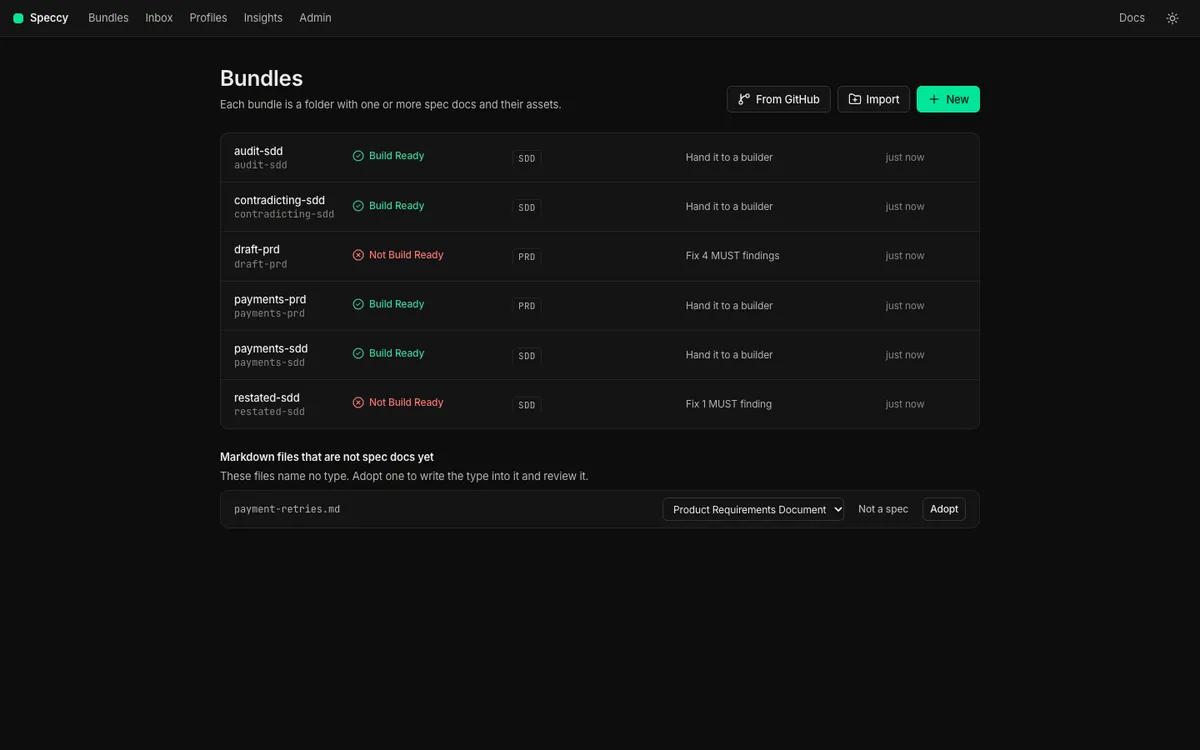
Section titled “Adopt a file in the app”The bundles screen lists the markdown files in the served folder that name no type, under Markdown files that are not spec docs yet.
-
Start Speccy in the folder:
Terminal window speccy -
On the bundles screen, find the file under Markdown files that are not spec docs yet.
-
Check the doc type in the picker. Speccy fills in the profile that the headings fit. Pick another type if the guess is wrong.
-
Select Adopt. Speccy writes
type: <key>into the file, and opens the new spec doc with its review.
With more than one file in the list, Adopt all picked types adopts every file that has a type in one step.
When you adopt a doc whose profile names an upstream type, Speccy looks in the same folder. If exactly one doc there has that type, the row offers the link, such as Link: implements prd.md. Keep the box checked, and Speccy writes the link into the frontmatter of the doc you adopt. Clear it, and Speccy writes no link.
speccy init does the same in a terminal. It writes .speccy.yaml, adds .speccy/state/ to .gitignore, and asks about each file that names no type. Press Enter to take the guessed profile, type another profile key, or type - to skip the file.
Import a file or a folder from anywhere
Section titled “Import a file or a folder from anywhere”Import takes a .md file, a .zip file, or pasted markdown. You can also drag a folder or a file onto the bundles screen.
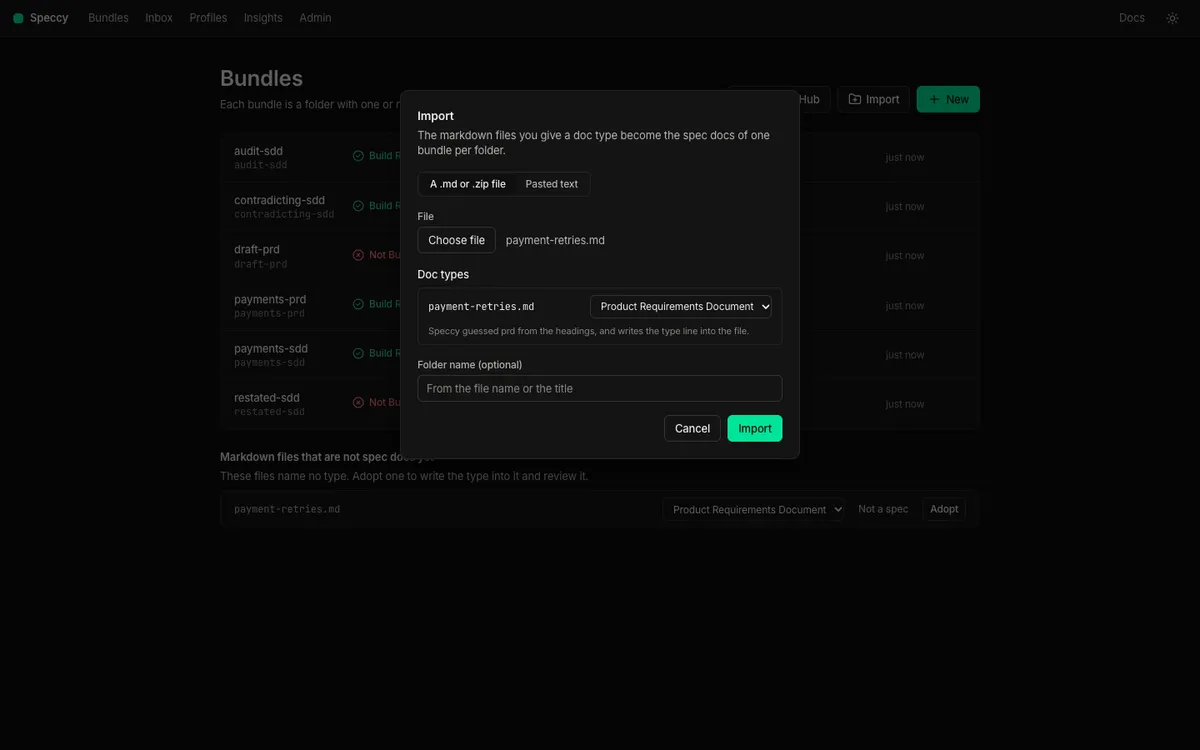
The dialog lists each markdown file with a doc type picker. The picker shows the type that the file names, or else the profile that its headings fit. Pick Not a spec for a file that is not a spec. Each file you give a type becomes a spec doc. The spec docs of one folder make one bundle. Speccy writes type: <key> into a file that names no type, and it changes nothing else.
When a PRD and an SDD sit side by side, the dialog offers the link between them under Links, checked. Speccy writes that link into the frontmatter of the SDD.
A drop of a folder with one markdown file imports it at once. A drop of a folder with several markdown files opens the dialog. So does a file whose type Speccy cannot guess. In local mode, Speccy writes the imported files to a new folder under the served folder.
Mark a file that is not a spec
Section titled “Mark a file that is not a spec”Most folders hold markdown that is not a spec: a readme, a changelog, meeting notes. Not a spec takes a file out of the list. The section then shows one line with the count of files you marked, and show lists them. Undo puts a file back in the list.
The mark lives in Speccy, for your workspace. The file does not change, and neither does the repo. The mark does not reach another workspace or the Action. When you accept a type for the file later, Speccy removes the mark.
Speccy never offers README.md, CHANGELOG.md, LICENSE.md, CONTRIBUTING.md, CODE_OF_CONDUCT.md, SECURITY.md, AGENTS.md or CLAUDE.md in these lists.
Review one doc in GitHub
Section titled “Review one doc in GitHub”Paste the source URL of the doc. A URL on any branch works, so a spec that is still in a pull request gets a review too.
- On the bundles screen, select From GitHub.
- Paste the URL in Address, and select Look. Speccy shows the repo, the branch, the folder, and the doc it opens.
- Check the Doc type. Speccy fills in the type that the doc names, or the type that the repo’s
.speccy.yamlmaps it to. Else it fills in a guess from the headings. - Select Add. Speccy reads the folder and opens the doc with its review.
The same step in a terminal:
speccy add https://github.com/acme/payments/blob/main/docs/sdd-retries.md --profile sdd--profile gives the type of a doc that names none. Without it, Speccy uses its guess. If no profile fits the headings, speccy add stops and lists the profile keys.
Speccy holds the type you confirm. This is an adopted type: the repo takes no commit, and the branch you read from does not move.
The URL of one doc makes a source for the folder of that doc. The other spec docs in that folder appear too. The other markdown files there appear as skipped docs, as the next section shows.
Review a folder or a repo in GitHub
Section titled “Review a folder or a repo in GitHub”A source URL can name a whole repo, a folder, or one doc. Speccy takes these forms:
acme/paymentshttps://github.com/acme/paymentshttps://github.com/acme/payments/tree/main/docshttps://github.com/acme/payments/blob/main/docs/prd-payments.md
A URL with no branch reads the default branch of the repo. A .git suffix and a GitHub Enterprise Server host both work.
Paste the URL under From GitHub, or run speccy add with it. Speccy reads the tree. Each markdown file that names a type, or that a mapping in the repo’s .speccy.yaml covers, becomes a spec doc at once. The scan passes over the other markdown files. Speccy calls them skipped docs.
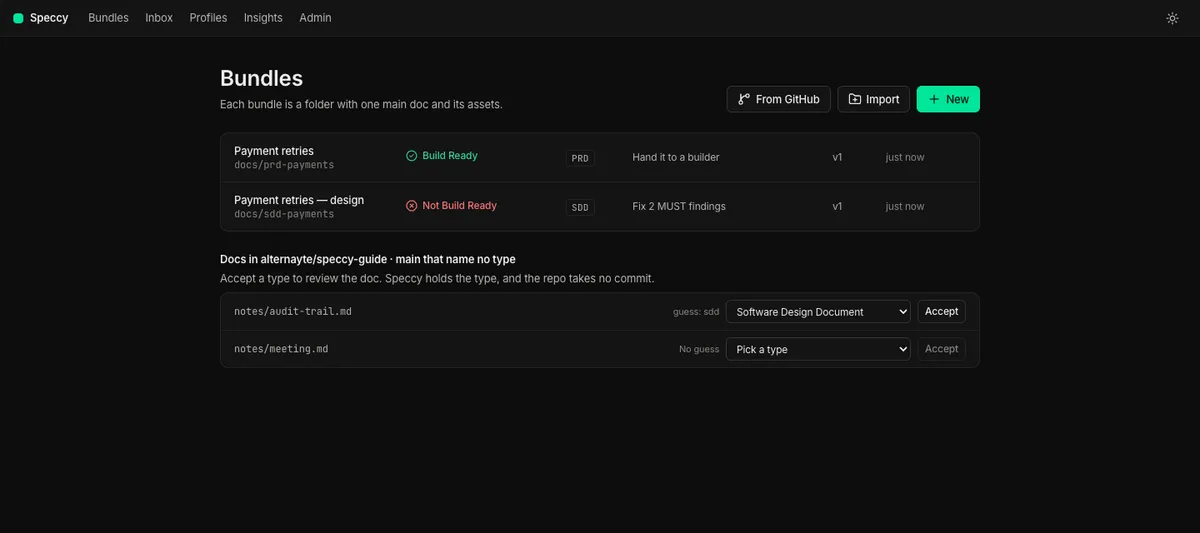
The bundles screen lists the skipped docs of each source under Docs in <repo> · <branch> that name no type. Each row shows the guess, a doc type picker, Not a spec, and Accept.
- Check the type of each doc you want reviewed.
- Select Accept on a row, or Accept all picked types to accept every row that has a type.
- Speccy makes the spec docs and reviews them. The repo takes no commit.
Not a spec works as it does on disk: the row leaves the list, and show and Undo bring it back. The list holds 200 files at most. Above that, it says how many files name no type, and you narrow the source to a folder.
When you accept a type for an SDD, Speccy offers the link to its PRD, as it does on disk. It offers the link only when exactly one doc in the same folder has the upstream type. Speccy stores the link you confirm as an adopted link. It writes nothing into the repo.
The repo always wins
Section titled “The repo always wins”An adopted type and an adopted link last only until the repo gives its own answer:
- When the doc gains
type:in its frontmatter, or.speccy.yamlgains a mapping that covers it, Speccy drops the adopted type on the next read. - When the doc names a link of the same kind in its frontmatter, that link replaces the adopted link.
The spec doc stays the same doc, with its threads and its waivers.
Write the types to the repo
Section titled “Write the types to the repo”Your team’s Action does not read the types you accepted in Speccy. Write the mapping to the repo opens one pull request that adds the same answers to .speccy.yaml:
map: - glob: docs/*.md profile: sddSpeccy writes one glob for a folder only when you accepted every skipped doc in it with the same type. For a folder you accepted in part, it writes one mapping per doc, so a glob never takes in a doc you left alone. The pull request changes no doc, and it adds no workflow. To add the workflow too, run speccy init --github in a clone. Adopt a repo shows how.
How Speccy reads GitHub
Section titled “How Speccy reads GitHub”Speccy reads through the GitHub API. It writes no file into your folder and runs no git command.
- In local mode, Speccy takes the token of your
ghlogin. Rungh auth loginfirst. With nogh, paste a fine-grained token under Admin → GitHub. - In hosted mode, Speccy uses the workspace token that an admin sets under Admin → GitHub. Only an admin can add a source or accept a type. Any member can mark a doc as not a spec.
Speccy reads each source when it starts and every 5 minutes after that. Sync under Admin → GitHub reads a source at once.
An edit you make in Speccy to a doc from GitHub is a draft. The GitHub control on the doc shows Unpublished. Open a pull request puts the changed files on a new branch, speccy/<bundle>-v<version>-<time>, and opens a pull request into the source branch. Discard the changes takes the text from GitHub again.
What each surface does
Section titled “What each surface does”| Surface | What it does for docs you already have |
|---|---|
| The web app | Every way in: Adopt, Import, From GitHub, Accept, Not a spec, and Write the mapping to the repo |
| The CLI | speccy review <file>, speccy init, speccy add <url> and speccy init --github |
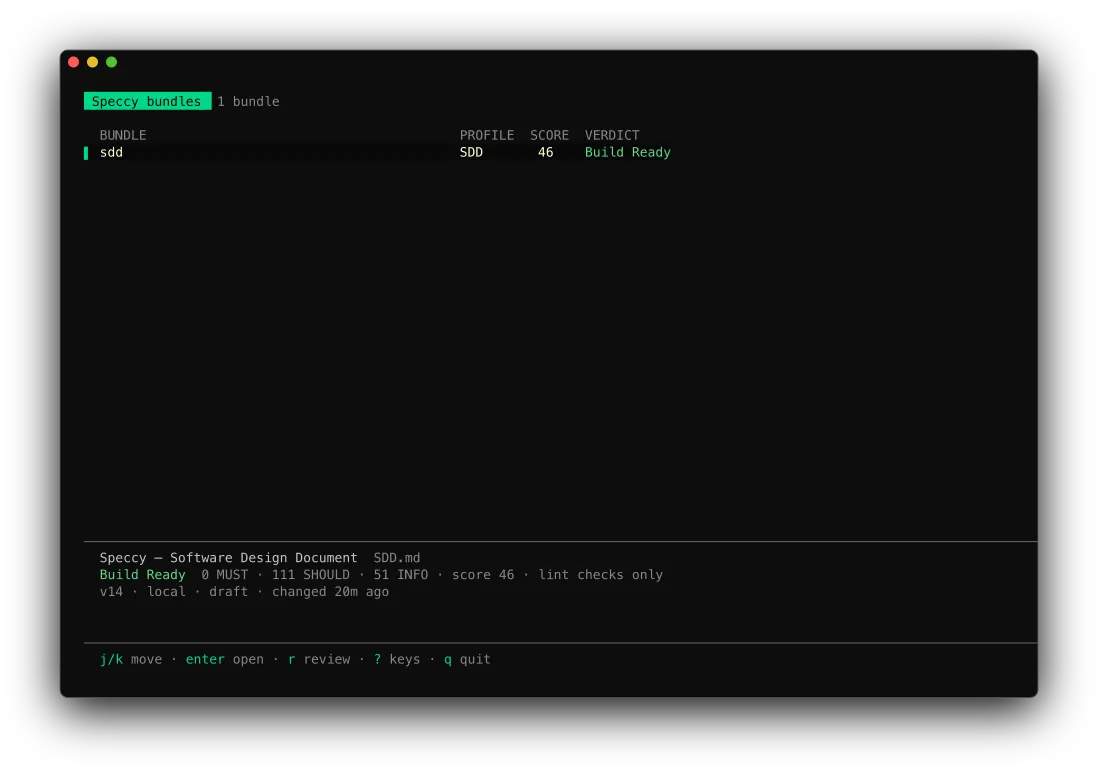
| The TUI | Reviews only: the list, the verdict, the findings and the tour. It adds no source |
Next steps
Section titled “Next steps”- From a blank page to a build packet follows one doc through the daily loop.
- Adopt a repo and decide in a pull request brings the same checks to your pull requests.
- Link an SDD to a PRD covers two docs that must agree.