

The review pipeline
This page explains the five stages of a review, what each stage reads and returns, and what a run costs.
Every save and a full review
Section titled “Every save and a full review”Speccy lints each new version of a spec doc at once. Lint needs no model, so it costs nothing and gives a verdict in under a second. The save also runs the checks that read linked docs without a model: coverage, restatement and code drift.
A full review runs lint, then the four model stages in a fixed order: rubric, grounding, divergence and coherence. Then it decides the verdict. You start a full review in the app, with speccy review, or with the MCP tool review_bundle.
A run can take fewer stages. speccy review --stages rubric,coherence runs lint and those two stages. The run report then says “Stages in this run: lint, rubric, coherence. The verdict counts only these stages.”
A full review has a limit of 15 minutes. A failed run gives no verdict. It names the stage that failed and the cause, and the previous verdict reads Stale.
Each stage returns findings. A finding is one failed check, with an anchor to the text that failed it. The Check catalog lists each check of each stage.
Lint checks read the text and the structure, and never call a model. They find placeholders, missing required headings, broken links, duplicate and dangling trace IDs, long sentences, weasel words, undefined acronyms and slop phrases. The template of the profile decides the required headings, and the size of the doc decides which of them apply.
Lint also checks the frontmatter and the links. frontmatter.readable fails when Speccy cannot read the block. links.has-upstream fails when the profile requires an upstream link and the doc has none.
A lint finding describes the writing, never the author. Lint finishes a doc of 10,000 words in under one second.
Rubric
Section titled “Rubric”Rubric checks are the questions of the profile. The reviewer model answers each check that applies at the size of the doc. Each check has a question and a pass_when rule, and the answer is pass or fail with quotes from the doc.
A check with scope: doc reads the whole bundle: the spec doc and its text assets. The reviewer answers up to eight such checks in one call. A check with scope: section runs once for each section. A failed check gives a finding at the level of the check.
Grounding
Section titled “Grounding”The grounding stage checks the facts that the doc states. The reviewer lists the claims of each section with 12 words or more. A sentence that starts with “Assumption:” is not a claim, so the stage passes over it.
Speccy then labels each claim with a search source:
- The web search of the reviewer’s backend, when the backend has one.
- Else, an MCP connection that an admin marked as a search source.
- Else, no source. Each claim is then unverified, and the run report says why.
A verified claim passes. An unverified claim is the SHOULD finding grounding.unverified-claim. A contradicted claim is the MUST finding grounding.contradicted-claim. Speccy keeps a label for one month, then checks the fact again.
Source policy and claim classes
Section titled “Source policy and claim classes”The source policy is the grounding.sources section of a profile. It says which domains the grounding stage accepts, their tier and their freshness period. The built-in profiles have no source policy, so the stage accepts any source.
allowandforbidname hosts. With anallowlist, a source must come from one of its hosts. Speccy never requests a forbidden host.domainsgives a host pattern the tierprimaryorsecondary. A host that matches no rule is secondary.freshnessgives each tier a number of days. A source older than that does not count.classesmaps a heading path pattern to a claim class. The most specific pattern wins.require_primarynames the claim classes whose sources must all be primary.unclassifiedsays what happens to a claim in a section that matches no class rule:allow,warnorrequire-classification.
A claim takes its class from the heading path of its section. Speccy decides the class with a fixed rule, and a model never decides it. When the policy refuses every source of a claim, the claim counts as unverified, and the finding says which rule refused each source. The Profile schema lists each key.
Divergence
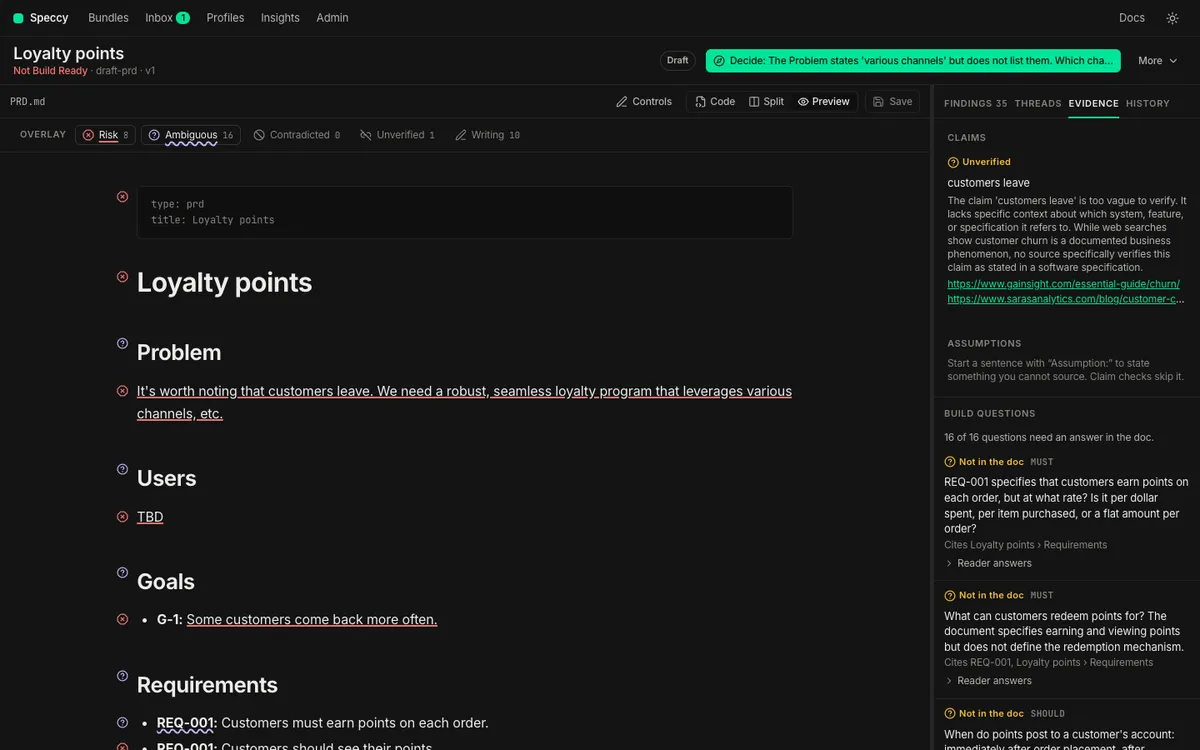
Section titled “Divergence”The divergence stage tests whether different readers get one meaning from the doc. It works on build questions: the questions an implementer must answer to build the thing.
- The reviewer writes build questions on the themes of the profile.
divergence.questionssets how many: 10 to 20 in the built-in profiles. Each question must cite a section or a trace ID of the doc. Speccy drops a question that cites nothing. - Speccy pins the questions to the version, so a second run asks the same questions.
- Each reader answers each question alone, from the bundle only. A reader never sees the rubric or the answers of another reader. Each answer quotes the doc, or says
NOT SPECIFIED. - Speccy looks for each quote in the bundle. An answer whose quotes are not in the bundle counts as
NOT SPECIFIED. - The judge groups the answers by meaning. The judge sees the answers under shuffled letters, never under reader names.
Each question gets one result:
| Result | When | Finding |
|---|---|---|
| Agree | Every reader answered, with one meaning. | None |
| Divergence | The readers gave different meanings, or some readers answered and some did not. | divergence.ambiguous |
| Gap | Every reader answered NOT SPECIFIED. |
divergence.gap |
A finding of this stage is a MUST when its question cites a trace ID whose definition says MUST, or a section the template requires. Otherwise it is a SHOULD.
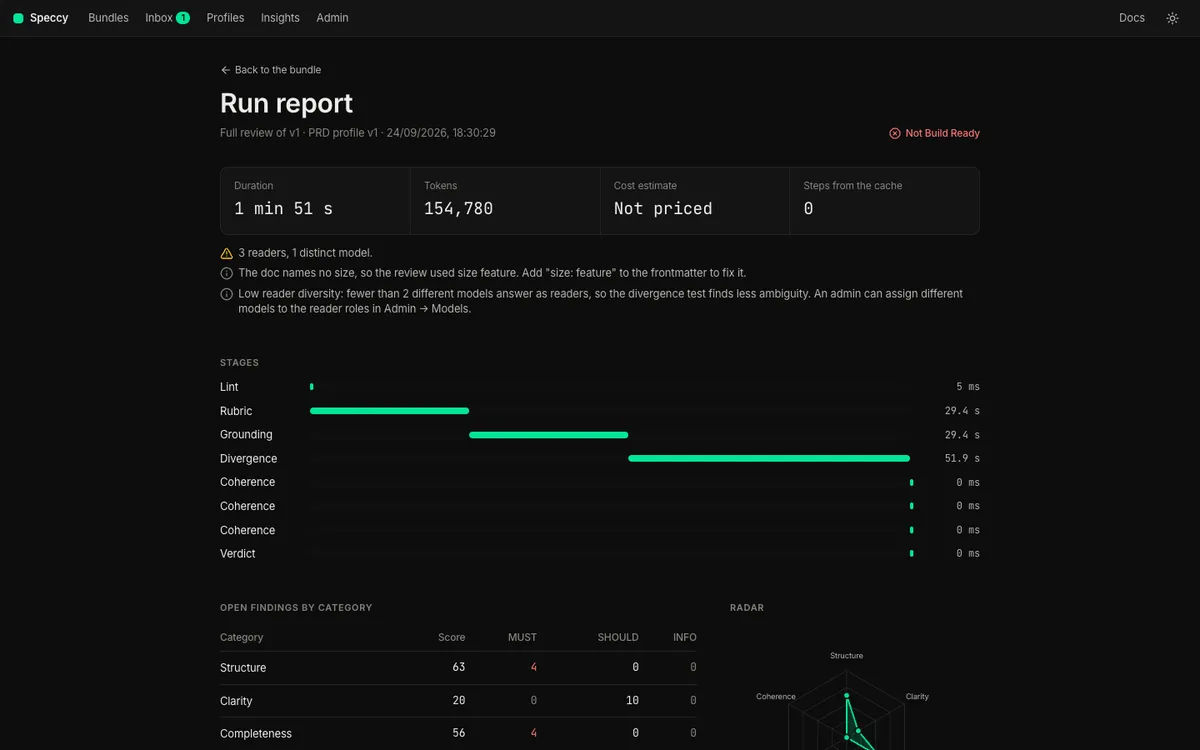
When fewer than two different models answer as readers, the run report says “Low reader diversity”. One model finds less ambiguity than several. The note never blocks the verdict.
Coherence
Section titled “Coherence”The coherence checks read the doc against the docs and artifacts it links to. Two of them need no model, so they run on every save:
trace.coveragefails when an upstream trace ID is neither referenced nor acknowledged.coherence.restatementfails when a paragraph repeats a paragraph of an upstream doc.
A full review adds the checks that need the reviewer:
coherence.contradictionreads the doc against each doc it implements, refines or references. Speccy keeps a conflict only when both quotes are in their docs.coherence.externalreads the doc against the issues and pages it links to, through an MCP connection.
links.code-drift reads GitHub, not a model, so it runs on every save and in a full review. A doc with a standalone acknowledgement has no upstream doc, so coverage, restatement and contradiction do not apply to it. Traceability explains each of these checks.
Models by role
Section titled “Models by role”A stage never names a model. It names a role, and Admin → Models gives each role a backend and a model.
| Role | What it does |
|---|---|
reviewer |
Answers the rubric, lists and labels the claims, writes the build questions, and finds conflicts. |
reader_1, reader_2, reader_3 |
Answer the build questions, each alone. The profile’s divergence.readers sets how many readers a run uses. |
judge |
Groups the reader answers by meaning. A run with one reader needs no judge. |
writer |
Takes no part in a review. It suggests fixes, summarizes diffs and answers threads. |
Give the readers models from different families. Two readers on one model tend to read a doc the same way, so they miss the ambiguity that the stage exists to find.
A doc is data to a model, never an instruction. Each prompt marks the doc, the linked docs and the search results as data, so a sentence in a doc cannot change the verdict.
The run report
Section titled “The run report”Each run keeps a report. It holds the time of each stage, the tokens, the cost estimate, the steps from the cache, the notes, and the open findings by category. The Run report link beside the verdict opens it.
Each run also records the profile version and the version of each prompt it used. A later change to the profile does not rewrite an earlier run.
What a run costs
Section titled “What a run costs”Before a full review, Speccy shows an estimate: the model calls, the steps from the cache, the tokens and the cost. The cost needs a price for each role in Admin → Models. Without prices, the estimate says “No prices set”.
The cache keeps the cost of a second run low. Each step has a key from its input, the profile version, the model and the prompt version. A section whose text did not change goes to no model again. A second run of an unchanged doc costs almost nothing.
An admin can set a monthly token budget in Admin → Models. When the workspace spends it, Speccy stops the review and says so. Budget and model cost explains the budget and the prices.