

Close a coverage gap
This guide shows you how to close a coverage gap on a spec doc, and how to undo the answer.
A coverage gap is a trace.coverage finding. An upstream doc, such as a PRD, defines a trace ID. The spec doc that implements it does not name that ID. The finding is a MUST, so the doc stays Not Build Ready until you answer it.
Before you start
Section titled “Before you start”- The spec doc has an
implementslink to the upstream doc. Link an SDD to a PRD shows how to add one. - The upstream doc defines trace IDs, such as
REQ-001. When it defines none, coverage does not apply, and no gap exists. - You can edit the bundle. In hosted mode, an author of the bundle or an admin can edit it.
Pick the answer
Section titled “Pick the answer”A gap has three answers. Each one closes the gap in the verdict and in the traceability matrix.
| Answer | Use it when | What Speccy writes |
|---|---|---|
| This doc covers it | A section of this doc meets the requirement. | The line Covers REQ-001. at the end of that section, as a new version. |
| Another doc covers it | A different spec doc meets the requirement. | An acknowledgement in the sidecar, after approval. |
| Out of scope | No doc meets it, and none has to. | An acknowledgement in the sidecar, after approval. |
The first answer changes the doc text, so a builder reads the ID next to the design. The other two are acknowledgements. They leave the doc text as it is.
Answer in the tour
Section titled “Answer in the tour”-
Open the spec doc. The next action in the control row reads “Decide: does this doc cover REQ-001?”. Click it to open the tour. More → Tour opens the same tour.
-
On the gap, click Decide, or press
d.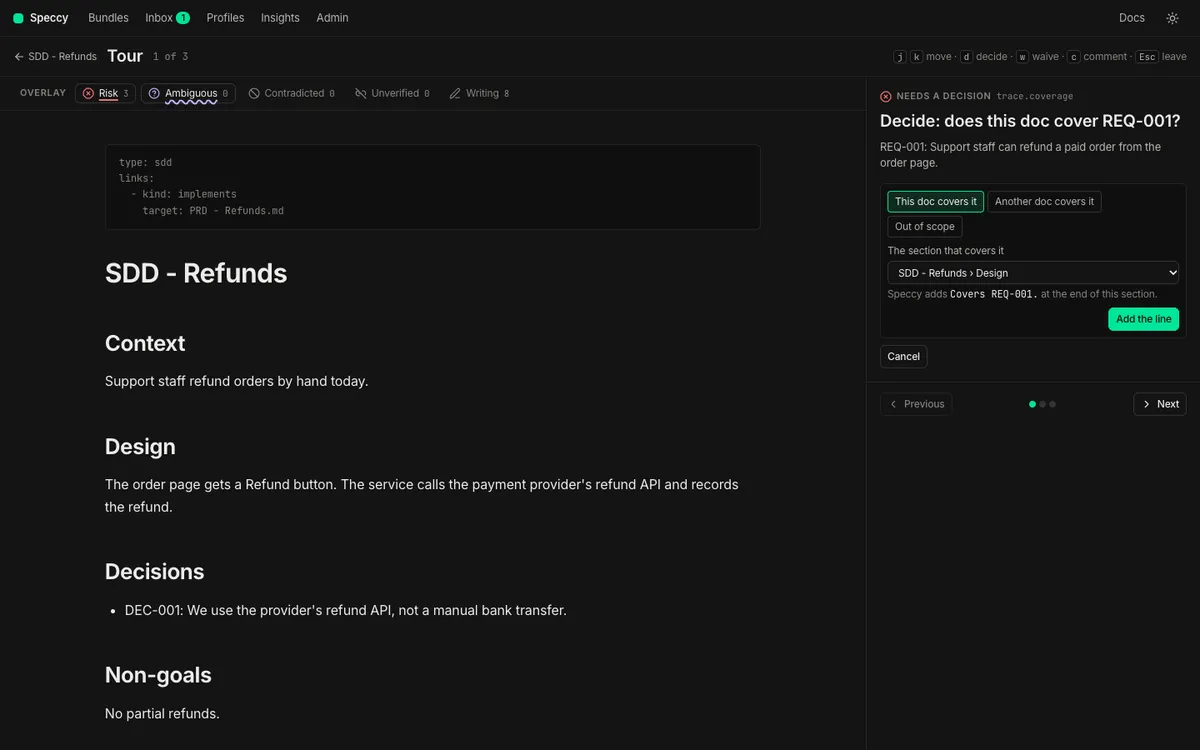
-
Pick one answer.
- This doc covers it: pick a section under The section that covers it. Speccy shows the line it adds.
- Another doc covers it: pick the doc under The doc that covers it, and write a Reason.
- Out of scope: write a Reason.
A reason needs at least 20 characters.
-
Click Add the line for the first answer, or Ask for approval for the other two.
Answer in the findings rail
Section titled “Answer in the findings rail”-
Open the Findings tab of the rail, and find the
trace.coveragefinding. Its message names the trace ID. -
Click Answer the gap under the finding.
-
Pick the answer and fill in the fields, as in the tour.
-
Click Add the line or Ask for approval. A line above the list says what Speccy did.
A coverage gap has no Ask for a waiver control. Speccy refuses a plain waiver of trace.coverage, because an acknowledgement closes the gap in the verdict and in the matrix with one record.
Answer on the Traceability page
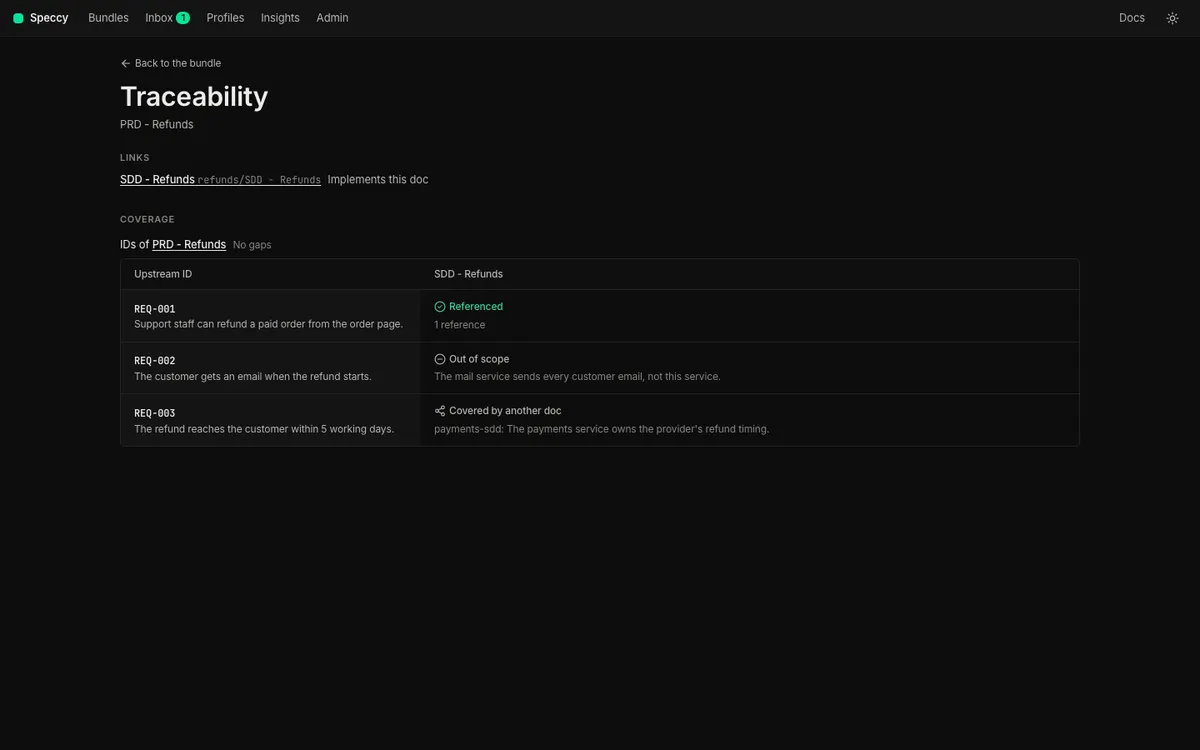
Section titled “Answer on the Traceability page”The matrix on the upstream doc’s Traceability page shows each gap of each doc that implements it. You can answer a gap there.
-
Open the upstream doc, such as the PRD. Click More → Traceability.
-
Find the cell that reads Not covered. Its row is the trace ID, and its column is the spec doc that implements the upstream doc.
-
Click Answer in the cell. The three answers open for the spec doc of that column.
-
Pick the answer and fill in the fields, as in the tour. Click Add the line or Ask for approval.
Answer shows only when you can edit the spec doc of that column. It shows only after a review found the gap.
Approve an acknowledgement
Section titled “Approve an acknowledgement”The profile’s waiver policy decides who approves an acknowledgement. trace.coverage is a MUST check. The built-in PRD and SDD profiles give a MUST to a maintainer of the profile.
-
Open the request. It waits in the approver’s Inbox, in the tour, and on the finding in the findings rail.
-
Read the reason. The tour asks, for example, “Approve or reject: REQ-002 is out of scope for this doc.”
-
Click Approve, or click Reject and give a decision reason of at least 20 characters.
In local mode, you are the only person, and you have every role. You approve your own request in the same way.
Ask for and approve a waiver covers the policies, the inbox and the next waiver control.
What happens
Section titled “What happens”- This doc covers it. Speccy writes the line as a new version of the spec doc. Lint runs on the new version. The finding goes, and the matrix cell reads Referenced. For a doc in a GitHub source, the new version is a draft until you publish it.
- Another doc covers it or Out of scope. Speccy records a request, and the gap stays open. On the last approval the policy needs, Speccy writes a
trace:entry to the sidecar,.speccy/decisions/<doc path>.yaml. The finding goes, and the matrix cell reads Covered by another doc or Out of scope, with the reason.
The Traceability page shows the result. Open it from More → Traceability. It shows the matrix and each answer. A Referenced cell links to each reference. Click one to open the spec doc at that line.
An approved acknowledgement names the trace ID, not a section. An edit to the spec doc does not end it. A waiver of a check ends when its section changes, but an acknowledgement stays until a person withdraws it.
This is the sidecar entry that Speccy writes:
trace: - id: REQ-002 status: out_of_scope reason: The mail service sends every customer email. acknowledged_by: nathan - id: REQ-003 status: covered_by target: refunds/SDD - Ledger reason: The ledger design owns the refund entries. acknowledged_by: nathanUndo an answer
Section titled “Undo an answer”This doc covers it. The line Covers REQ-001. is plain prose in the doc. Delete it, or delete every other mention of the ID, and save. Lint runs on the new version, and the gap opens again.
Another doc covers it or Out of scope. Withdraw the acknowledgement on the Traceability page:
-
Open the upstream doc’s Traceability page. Find the cell that reads Covered by another doc or Out of scope.
-
Click Withdraw in the cell.
-
Read what happens, and click Withdraw again.
A withdrawal takes effect at once. It needs no approval, because it only makes the verdict stricter. Speccy takes the trace: entry out of the sidecar with the same write that an approval uses. Lint runs again, the gap opens again, and the verdict counts it. For a doc in a GitHub source, the sidecar change is a draft until you publish it. The waiver list of the spec doc shows the acknowledgement as withdrawn, with the name of the person who withdrew it.
Withdraw shows only when you can edit the spec doc of that column. A Referenced cell has no Withdraw. Its reference is prose in the doc, so you delete it in the doc.
You can also delete the entry from the sidecar yourself:
-
Open
.speccy/decisions/<doc path>.yaml. For a folder that Speccy serves, the file sits under the root of that folder. For a doc in a GitHub repo, the file sits in the repo. -
Delete the item under
trace:whoseidis the trace ID. Delete the whole file when nothing else is left in it. -
Save the file. In a GitHub repo, commit the change.
Speccy watches the sidecar of a folder that it serves. It lints the doc again, and the gap opens again. A doc in a GitHub source takes the change on its next sync.
Related
Section titled “Related”- Traceability: trace IDs, the matrix and coverage.
- Waivers and the sidecar: how an acknowledgement uses the waiver mechanism.
- Sidecar format: every key of the sidecar.
- Reply commands:
/speccy ackanswers a gap in a pull request. trace.coveragein the Check catalog.